
Overview
How I built a real-time monitoring dashboard to visualize what 19 Claude Code subagents are doing – from a failed Gather Town experiment to a practical WebSocket-powered control center.
This is a sequel to [Claude Code] Designing an Expert Team with Subagents. In the previous post, I designed a team of 15 AI agents. Since then, the team has grown to 19 – adding dedicated reviewers for each domain and separating the infra roles – all orchestrated through Claude Code’s subagent system. The team was built. The agents were defined. The skills and hooks were wired up. But one critical question remained: when all 19 agents are working at once, how do you know what is actually happening?
Steps
1. The Problem – Flying Blind with 19 Agents
Running a single Claude Code session is manageable. You see the output scrolling by, you read the tool calls, you approve or reject. But the moment you start orchestrating subagents in parallel, that simplicity vanishes.
The COO (main session) delegates tasks to three planners simultaneously. They finish, and two developers spin up. Then four reviewers launch in parallel. A security auditor runs alongside a QA engineer. All of this happens through Claude Code’s hook system, firing HTTP events as agents start, stop, use tools, and complete tasks.
But from the user’s perspective? You see a single terminal. The COO reports summaries when phases complete, but between those reports, you are blind. You do not know which agent is currently working. You cannot tell if an agent has been stuck for ten minutes or is about to finish. If the security auditor finds a critical vulnerability, you will not know until the entire phase completes and the COO surfaces it.
With 19 agents and multi-phase pipelines, this became untenable. I needed visibility.
2. The First Attempt – Gather Town-Style 2D Office
My first idea was ambitious, perhaps too ambitious. I wanted to build a Gather Town-style 2D virtual office where each agent had a desk, walked around with pixel-art sprites, and exhibited personality-driven idle behaviors. Product Planner Kim Soyeon would be a socializer who chats in the cafeteria. Backend Developer Park Dohyeon would snack at his desk. The COO character would walk to the CEO’s office to deliver reports, agents would queue up at the COO’s desk, and completed agents would celebrate with confetti particles.
I actually built this. The README from the early version describes it in full detail: team zones for Dev, Planning, QA/Security, and Review. A cafeteria where idle agents grab coffee. A level-up system with desk decorations. Weather synced to real conditions via the Open-Meteo API. Time-of-day lighting that shifts from morning warmth to night-mode overtime glow. TTS voice reports where the COO reads summaries aloud using Google’s Gemini or Chirp voices. An “encourage” button that sends heart particles to boost an agent’s animation speed.
It was genuinely fun. Watching pixel-art agents walk to the cafeteria, scratch their heads on errors, and hi-five after completing long tasks brought a surprising amount of joy to solo development.
But it was also impractical. The 2D office was visually charming, yet it obscured the very information I needed most: which agents are active right now? What are they working on? How long have they been running? Did anything fail? The pixel-art sprites and walking animations consumed development time and screen real estate without improving situational awareness. The fun elements were delightful distractions from a monitoring tool that needed to prioritize clarity.
So I pivoted. I kept the server, the WebSocket infrastructure, and the hook integration – the architectural core was solid. But I replaced the 2D office client with a purpose-built dashboard focused on one thing: making agent activity visible at a glance.
3. Dashboard Architecture
The project uses a pnpm workspace monorepo with three packages.
claude-code-agent-dashboard/
  packages/
    shared/     # Types, constants, agent definitions
    server/     # Hono HTTP server + WebSocket broadcaster
    client/     # React 19 SPA (Vite + Tailwind CSS 4 + zustand)
The tech stack is deliberately simple. Hono handles both the REST API and WebSocket upgrades on a single port (3100). The client is a standard React 19 + Vite + Tailwind CSS 4 SPA with zustand for state management. The shared package contains TypeScript types and the agent definition registry – the single source of truth for all 19 agents (including the COO).
3.1. Data Flow
The core architecture is a unidirectional event pipeline.
┌──────────────────┐     HTTP POST     ┌──────────────────┐
│ Claude Code      │──────────────────▶│                  │
│ (Hooks)          │                   │  Hono Server     │
├──────────────────┤     HTTP POST     │  (:3100)         │
│ COO              │──────────────────▶│                  │
│ (task-assign)    │                   │  ┌────────────┐  │
└──────────────────┘                   │  │Agent Store │  │
                                       │  └─────┬──────┘  │
┌──────────────────┐    WebSocket      │        │         │
│ Browser          │◀──────────────────│  State Change    │
│ Dashboard        │                   │                  │
│                  │──REST (init)─────▶│                  │
└──────────────────┘                   └──────────────────┘
Claude Code fires hook events (SubagentStart, SubagentStop, PreToolUse, PostToolUse, etc.) as HTTP POST requests to http://localhost:3100/api/v1/events. The server processes each event, updates the in-memory agent store, and broadcasts the state change over WebSocket to all connected browser clients. The browser also makes REST calls on initial load to hydrate the full state.
3.2. Why Not Polling?
WebSocket was the obvious choice here. Hook events fire rapidly – a single agent session can generate dozens of PreToolUse/PostToolUse events per minute. Polling would either miss events or waste bandwidth. With WebSocket push, the dashboard updates within milliseconds of an agent state change.
4. Hook System Integration
Claude Code provides 11 hook event types. The dashboard server accepts all of them.
const KNOWN_EVENTS: HookEventName[] = [
  "SessionStart",
  "SessionEnd",
  "SubagentStart",
  "SubagentStop",
  "Stop",
  "TaskCompleted",
  "TeammateIdle",
  "PreToolUse",
  "PostToolUse",
  "PostToolUseFailure",
  "UserPromptSubmit",
  "Notification",
];
To connect Claude Code to the dashboard, you add HTTP hooks in ~/.claude/settings.json.
{
  "hooks": {
    "SubagentStart": [{
      "matcher": "",
      "hooks": [{ "type": "http", "url": "http://localhost:3100/api/v1/events" }]
    }],
    "SubagentStop": [{
      "matcher": "",
      "hooks": [{ "type": "http", "url": "http://localhost:3100/api/v1/events" }]
    }],
    "Stop": [{
      "hooks": [{ "type": "http", "url": "http://localhost:3100/api/v1/events" }]
    }],
    "TaskCompleted": [{
      "hooks": [{ "type": "http", "url": "http://localhost:3100/api/v1/events" }]
    }],
    "SessionStart": [{
      "hooks": [{ "type": "http", "url": "http://localhost:3100/api/v1/events" }]
    }],
    "SessionEnd": [{
      "hooks": [{ "type": "http", "url": "http://localhost:3100/api/v1/events" }]
    }]
  }
}
Each hook fires an HTTP POST with a JSON payload containing the hook_event_name, session_id, agent_type, and contextual fields like last_assistant_message or tool_name. The server normalizes these payloads, identifies which agent the event belongs to, and updates the store accordingly.
The event processing flow looks like this.
- SubagentStart – An agent has been spawned. The server creates or updates the agent’s state to “working” and records the start time
- SubagentStop / Stop – An agent has finished. The server checks the
reasonfield in theSubagentStoppayload for"error"or"failure"and sets the status accordingly. An early implementation searchedlast_assistant_messagefor the keyword “error”, but this caused false positives – an agent mentioning “ErrorHistory.tsx” in its response would trigger an error state. Switching toreasonfield detection solved this. One subtlety withStop: it fires after every response, not just at session end. If we reset the COO on everyStop, it would flicker to idle between responses. The solution:Stopskips the COO entirely. COO only returns to idle onSessionEnd.UserPromptSubmitsets the COO’s default task to a generic “processing CEO instruction”, whichtask-assigncan override with a specific description - PreToolUse / PostToolUse – An agent is actively using tools. These events confirm the agent is still alive and working
- TaskCompleted – A team task has finished. Used for Agent Teams coordination
- SessionStart / SessionEnd – The main Claude Code session lifecycle
The server always returns HTTP 200, even on parse errors. This is critical – a failing dashboard hook must never block Claude Code’s agent execution.
5. The task-assign Pattern
Here is where I hit an interesting limitation. When Claude Code fires a SubagentStart hook, the payload contains the agent_type (e.g., “product-planner”) but not a human-readable description of what the agent was asked to do. The hook system tells you who started but not why.
This matters for the dashboard. Showing “product-planner: working” is far less useful than showing “product-planner: Market research and PRD for voice memo feature”.
The solution is the task-assign pattern. Before the COO (main session) invokes a subagent, it sends a pre-registration request to the dashboard server.
curl -s -X POST http://localhost:3100/api/v1/task-assign \
  -H 'Content-Type: application/json' \
  -d '{"agent_type":"product-planner","task":"Market research and PRD for voice memo feature"}' \
  2>/dev/null || true
The server stores this in a pendingTaskStore. When the SubagentStart event arrives moments later, the server matches it by agent_type and attaches the pre-registered task description. The || true at the end ensures that if the dashboard server is down, the COO’s workflow is not interrupted.
The task-assign endpoint also immediately transitions the agent’s status to “working” on the dashboard, giving the user visual feedback even before Claude Code’s hook fires. For the COO itself, the same pattern applies with agent_type: "coo" to show what the orchestrator is currently doing.
// Server-side: task-assign route
taskAssignRoute.post("/", async (c) => {
  const body = await c.req.json<{ agent_type?: string; task?: string }>();

  if (body.agent_type !== "coo") {
    pendingTaskStore.set(body.agent_type, body.task);
  }

  if (body.agent_type === "coo" || AGENT_MAP.has(body.agent_type)) {
    const agent = agentStore.get(body.agent_type);
    if (agent) {
      const updates: Partial<AgentState> = { originalTask: body.task };
      if (agent.status !== "working" && agent.status !== "reporting") {
        updates.status = "working";
        updates.startedAt = new Date().toISOString();
      }
      agentStore.update(body.agent_type, updates);
      broadcaster.broadcast(buildAgentUpdatePayload(agent));
    }
  }

  return c.json({ ok: true });
});
This pattern – pre-registering intent before the system event fires – turned out to be a clean workaround for the hook system’s limited context. The COO’s workflow rules in ~/.claude/rules/workflow.md make this behavior automatic: every agent invocation is preceded by a task-assign call.
There was one problem with this approach: the COO sometimes forgot to call task-assign. I encoded it as a mandatory rule in the workflow instructions, emphasized it with “absolutely must do this”, but the COO still occasionally skipped it. Rules are suggestions to an LLM, not guarantees.
The fix was mechanical rather than instructional. The PreToolUse hook fires every time any tool is invoked, including the Agent tool. When the server receives a PreToolUse event with tool_name “Agent”, it extracts subagent_type and description from the tool_input and automatically registers the task – exactly what task-assign does, but triggered by the hook system rather than a manual curl call. The COO no longer needs to remember. The system handles it.
Two timing mechanisms keep the dashboard clean. First, after an agent completes, it transitions to idle after a 10-second delay rather than immediately. This brief pause gives you time to read the completion result before the card disappears from the Active column. Second, task descriptions registered via task-assign expire after 5 minutes if no matching SubagentStart event arrives. This prevents stale entries from accumulating in the pendingTaskStore and polluting future sessions – if the COO pre-registers a task but the subagent never launches (perhaps due to a plan change), the orphaned entry quietly cleans itself up.
6. Agent Registry
All 19 agents (including the COO) are defined in a shared constant file. Each agent has a unique ID, a Korean name, a team assignment, a role description, and personality traits left over from the 2D office era.
export const AGENTS: AgentDefinition[] = [
  // Planning Team
  {
    id: "product-planner",
    name: "김소연",
    team: "planning",
    role: "Product Planner",
  },
  {
    id: "dev-planner",
    name: "이준혁",
    team: "planning",
    role: "Technical Designer",
  },
  // ... 16 more agents
  {
    id: "coo",
    name: "윤시현",
    team: "coo",
    role: "Chief Operating Officer",
  },
];
The Korean names are a deliberate choice. When the COO references “Product Planner Kim Soyeon” in its orchestration messages, it feels like coordinating with a real team. It also makes the dashboard’s sidebar much more readable than a list of IDs like “product-planner” and “server-reviewer-quality”.
7. Organization Structure
The entire system follows a corporate hierarchy metaphor.
CEO (User) → COO - Yun Sihyeon (Orchestrator)
| Planning Team | Dev Team | Review Team | QA & Security |
|---|---|---|---|
| Product Planner Kim Soyeon | Web Developer Kang Harin | Web Arch Choi Yujin | QA Engineer Oh Taeyun |
| Technical Designer Lee Junhyuk | iOS Developer Yun Seojin | Web Quality Im Subin | Security Auditor Shin Jaewon |
| UI/UX Designer Han Yeseul | Backend Developer Park Dohyeon | iOS Arch Bae Jihun | |
| Technical Writer Jo Minji | Infra Engineer Jeong Wooseong | iOS Quality Song Daeun | |
| Server Arch Hwang Minho | |||
| Server Quality Jeon Jisu | |||
| Infra Security Kwon Doyun | |||
| Infra Ops Na Youngjun |
The CEO (user) gives a high-level instruction. The COO (Claude Code main session) breaks it down, assigns agents, coordinates phases, handles errors, and reports back. Each agent is a subagent with a defined role, model assignment (Opus for creative/critical tasks, Sonnet for patterned work), and permission level.
8. Dashboard UI
The dashboard replaced the 2D office with a clean, information-dense layout optimized for monitoring.
8.1. Sidebar – Agent Roster
The left sidebar lists all agents grouped by team: Staff, Planning, Dev, Review, QA, and Security. Each agent shows a colored status dot.
- Gray – idle (ready for work)
- Blue (pulsing) – working (actively processing)
Completed and error states briefly show green or red for 10 seconds before returning to idle gray. This gives enough time to notice the transition without cluttering the sidebar.
Clicking any agent opens the Agent Detail side sheet.
8.2. Three-Panel Main Area
The main content area is split into three columns.
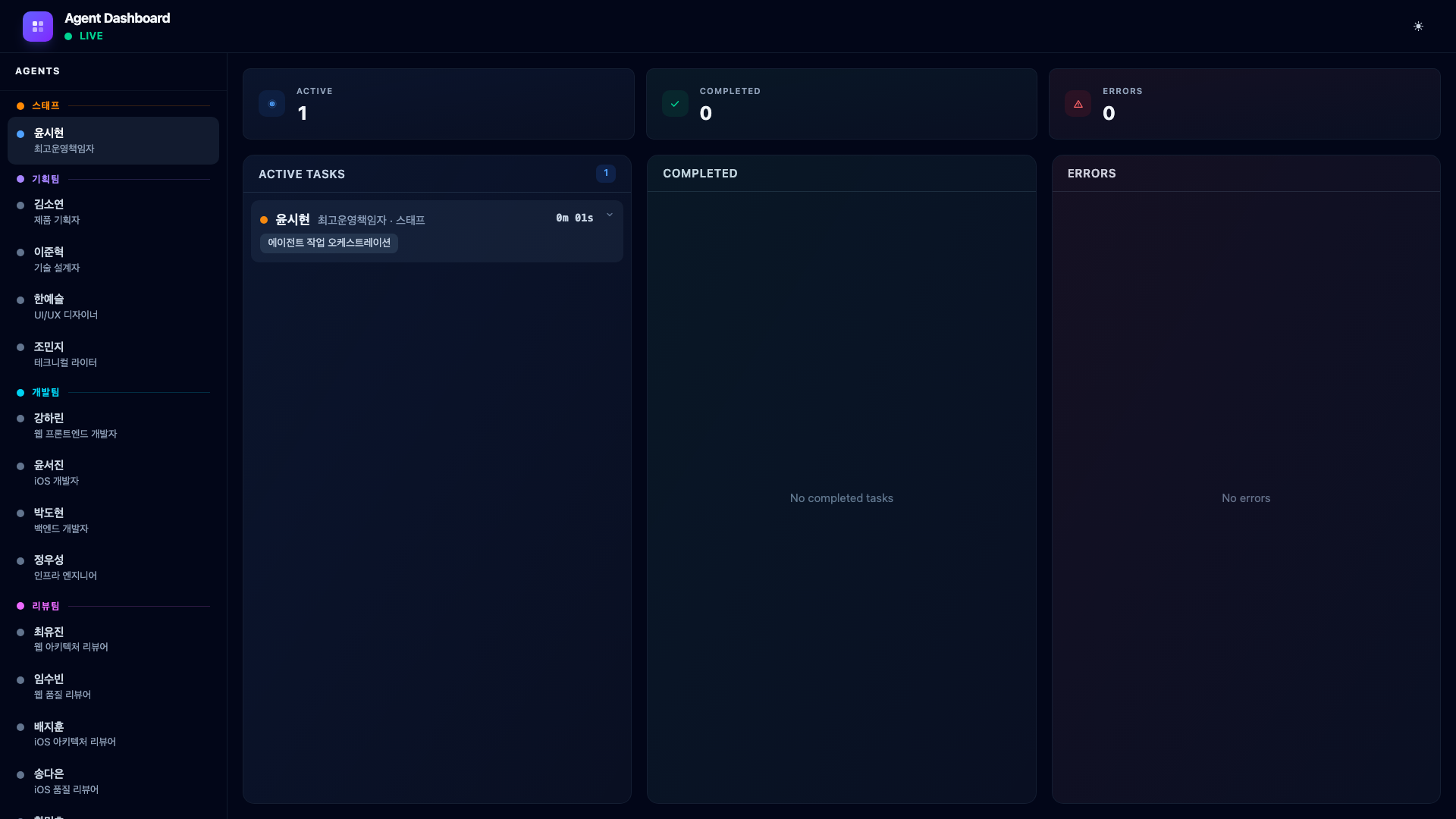
Active Tasks shows currently running agents with their task descriptions and elapsed time. Each card displays the agent’s Korean name, role, team, the task they were assigned, and a real-time timer.
Completed lists finished tasks in reverse chronological order. Each card is expandable – clicking it reveals the full result rendered as markdown with Tailwind Typography. This is where you see the actual output: PRD documents, code review summaries, test results.
Errors shows agents that encountered problems. The error message from the agent’s last_assistant_message is displayed, making it easy to identify what went wrong without digging through Claude Code’s transcript files.
8.3. Summary Counters
Three summary cards at the top show the current session’s totals: active count, completed count, and error count. These update in real time as agents transition between states.
8.4. Agent Detail Side Sheet
Clicking any agent in the sidebar opens a detail panel showing their current status, the task they are working on (or completed), their streak count (consecutive completions without errors), total completed tasks, and timestamps.
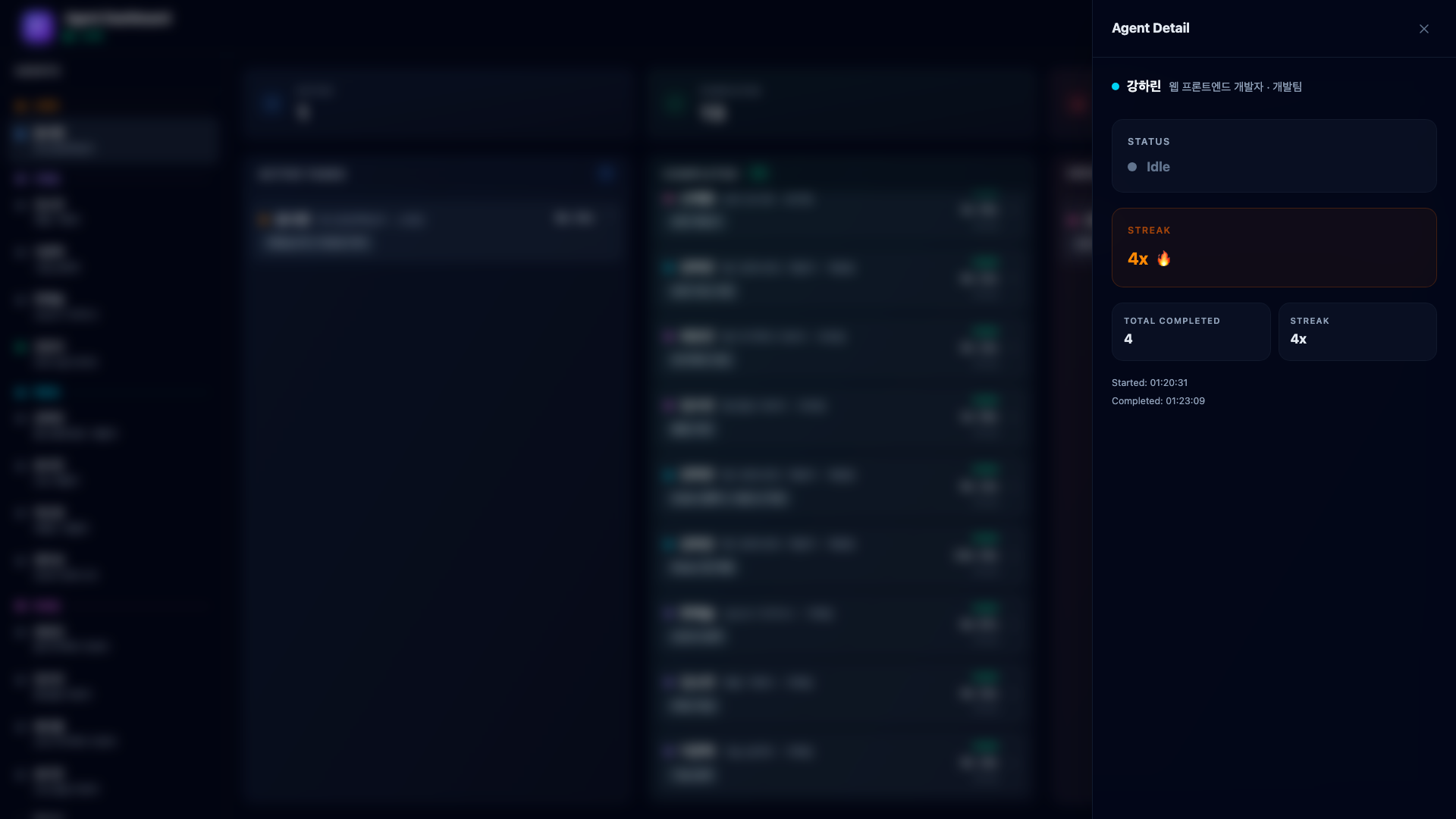
The streak system is a holdover from the 2D office – agents accumulate streaks for consecutive completions without errors. It is a small touch that makes monitoring more engaging.
9. Real-World Example – Voice Memo PoC with an Agent Team
The best way to understand the dashboard is to watch it handle a real multi-phase pipeline. Here is what it looks like when you tell Claude Code to build a voice memo PoC from scratch.
The prompt is simple:
“Research voice memo features in the market and build a PoC.”
The COO analyzes this request, creates a multi-phase plan, and starts orchestrating.
9.1. Phase 1 – Planning (3 Agents in Parallel)
The COO fires three task-assign calls, then invokes three planners as parallel subagents.
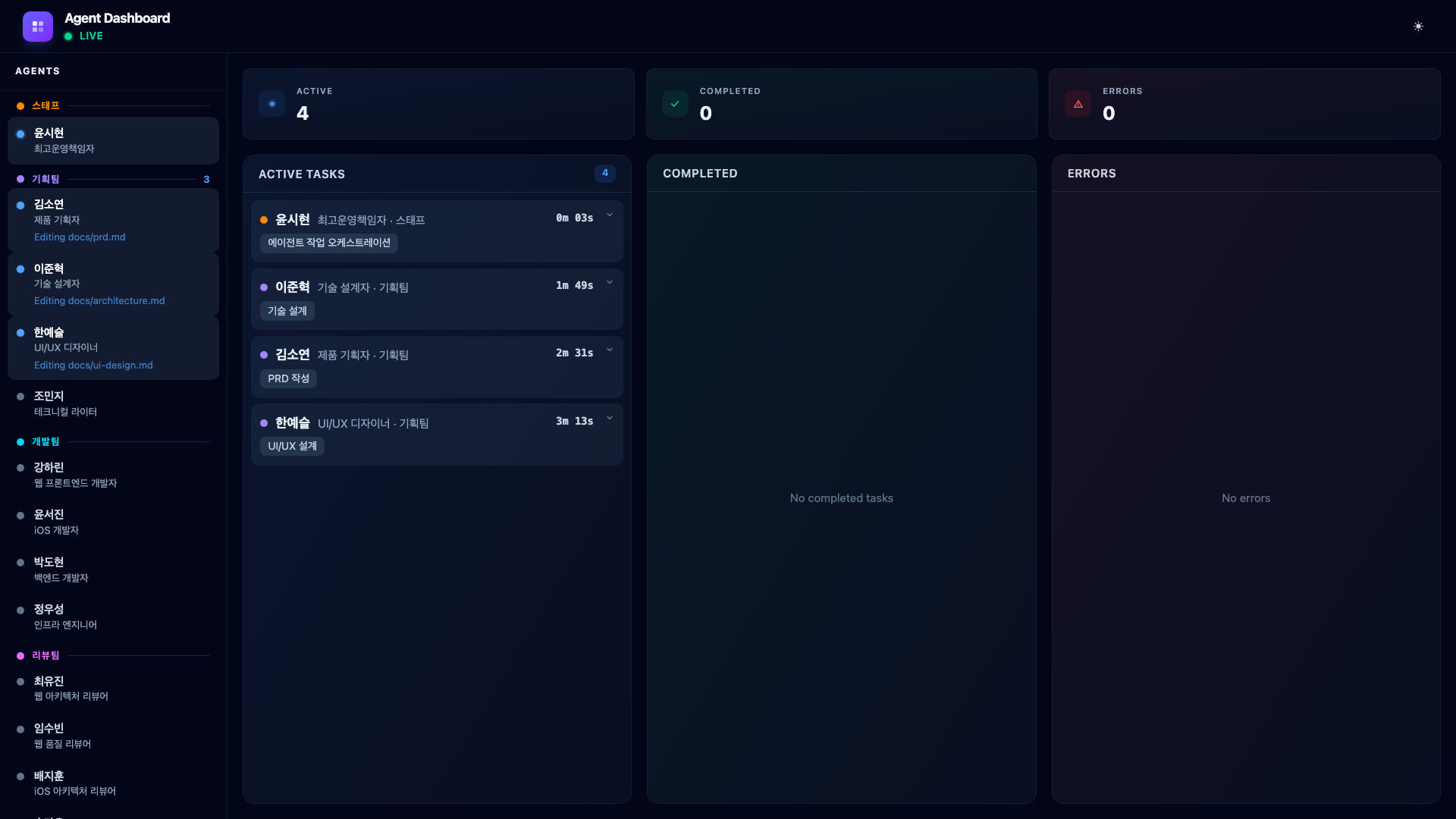
The dashboard immediately shows four cards in Active Tasks – the COO plus three planners. Product Planner Kim Soyeon is researching the voice memo market. Technical Designer Lee Junhyuk is designing the technical architecture. UI/UX Designer Han Yeseul is creating UI wireframes. Each card shows elapsed time ticking up in real time.
When all three complete, their cards slide from Active to Completed. The sidebar dots turn green.
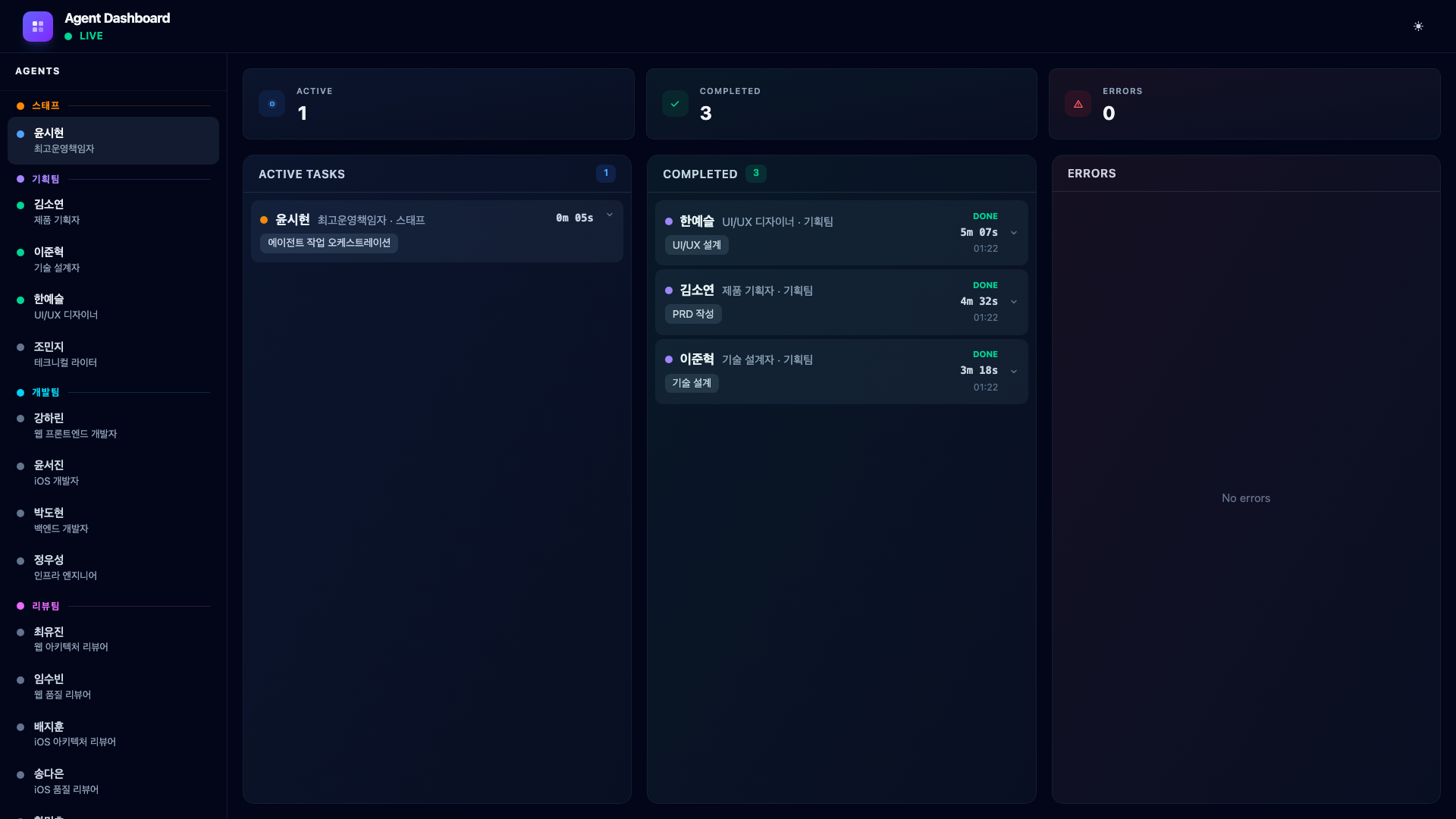
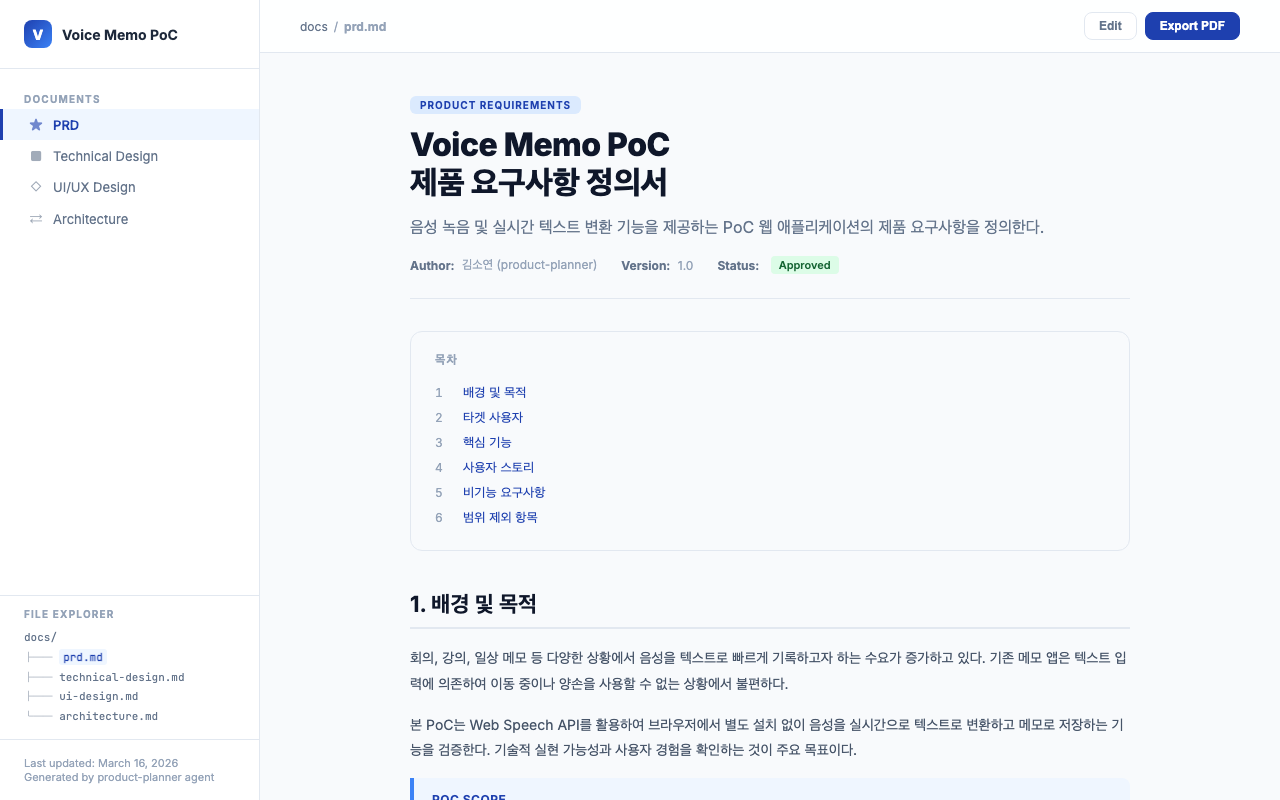
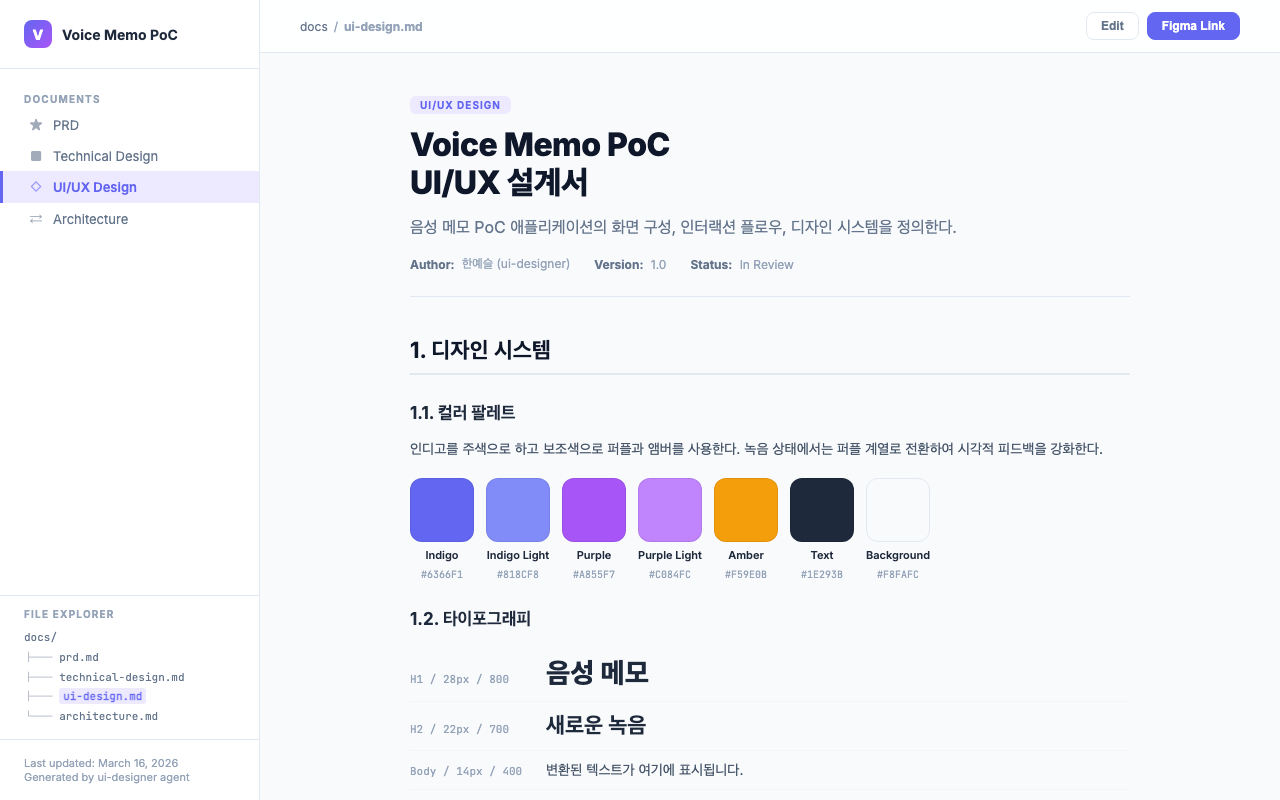
The planning agents generate design documents in the docs/ directory. Product Planner Kim Soyeon’s PRD contains a feature priority table and user stories. UI/UX Designer Han Yeseul’s UI design document includes the color palette, wireframes, and interaction flows.
9.2. Phase 2 – Development (1 Agent)
The COO reads the planners’ outputs and dispatches the web developer. Web Developer Kang Harin builds the React frontend with Web Speech API for real-time transcription and localStorage for memo persistence. Since this is a browser-native PoC, no backend server is needed.
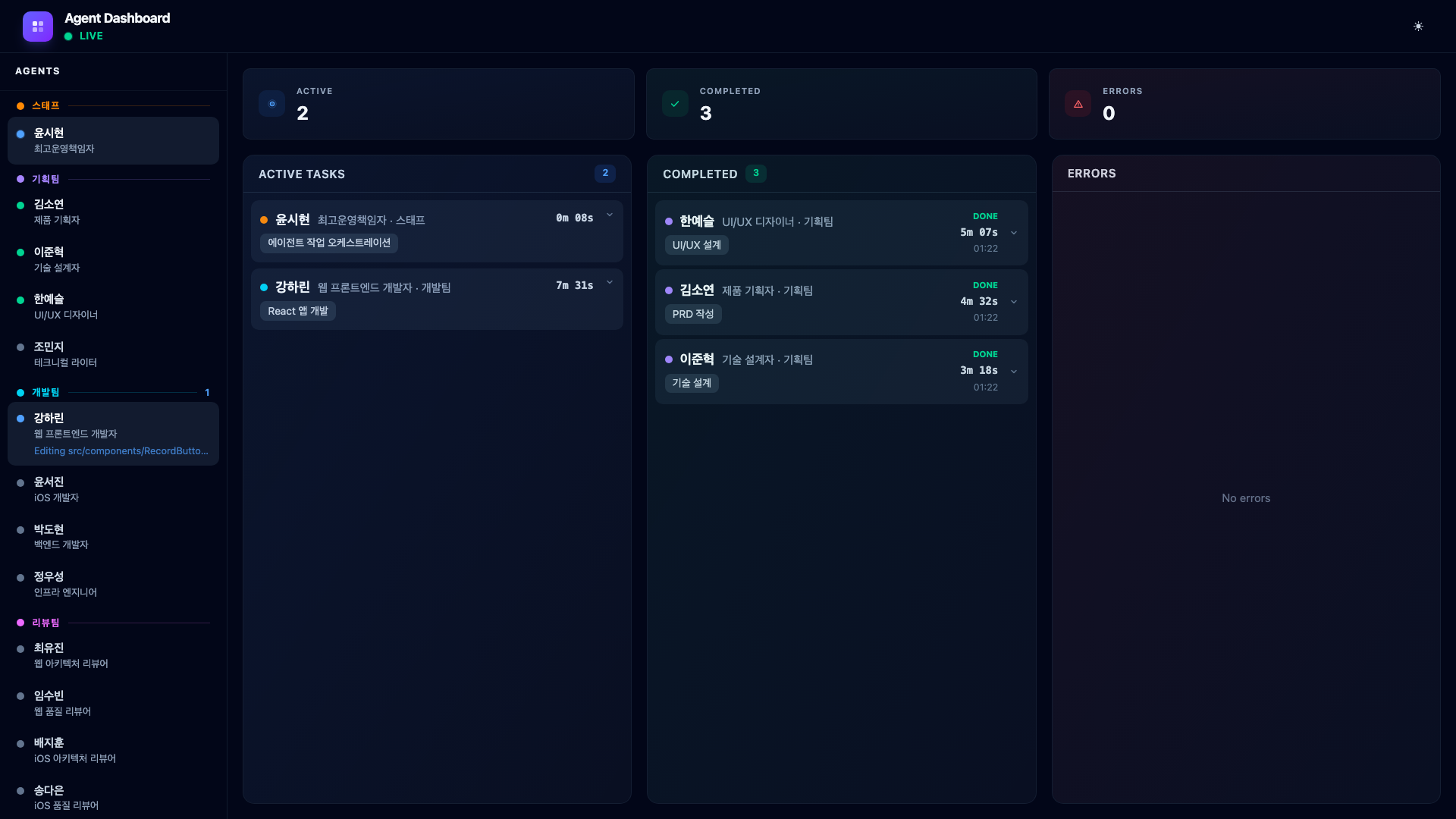
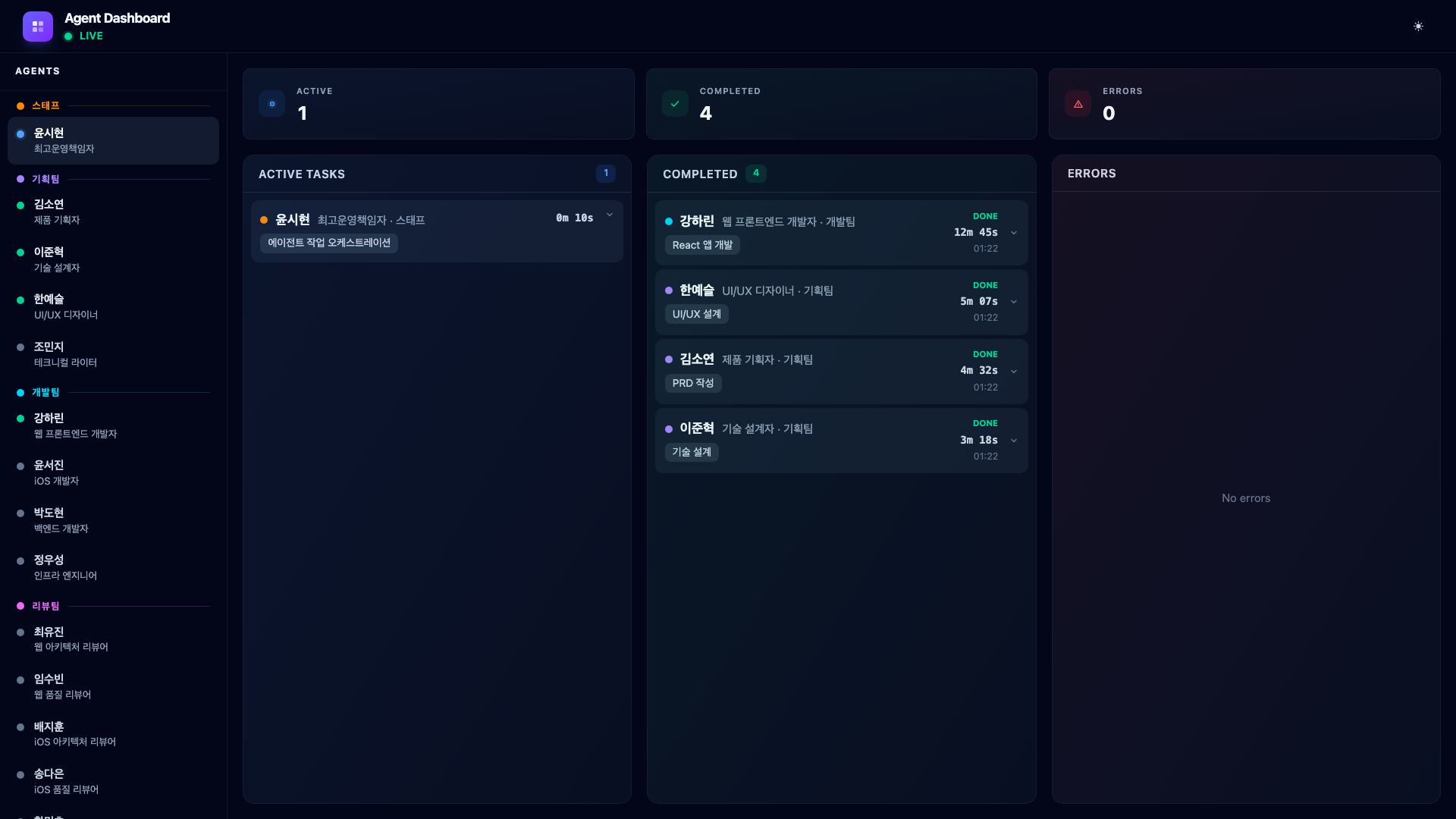
The dashboard shows the dev card in Active Tasks. The planning team’s entries are in the Completed column. The sidebar reflects this – planning agents are green, the dev agent is blue.
9.3. CEO Feedback – Testing and Iteration
This is where things get real. A PoC does not come out perfectly on the first try. I open the app, test it, and immediately notice problems. The Web Speech API works in Chrome but silently fails in Safari with no user feedback. The recording button is too small. There is no keyboard shortcut.
I type into Claude Code:
“Speech recognition doesn’t work in Safari. Add a fallback. Also, make the recording button bigger and let me use the Space key to record.”
The COO receives my feedback, updates its task to “Apply CEO feedback”, and re-dispatches Web Developer Kang Harin to implement the fixes.
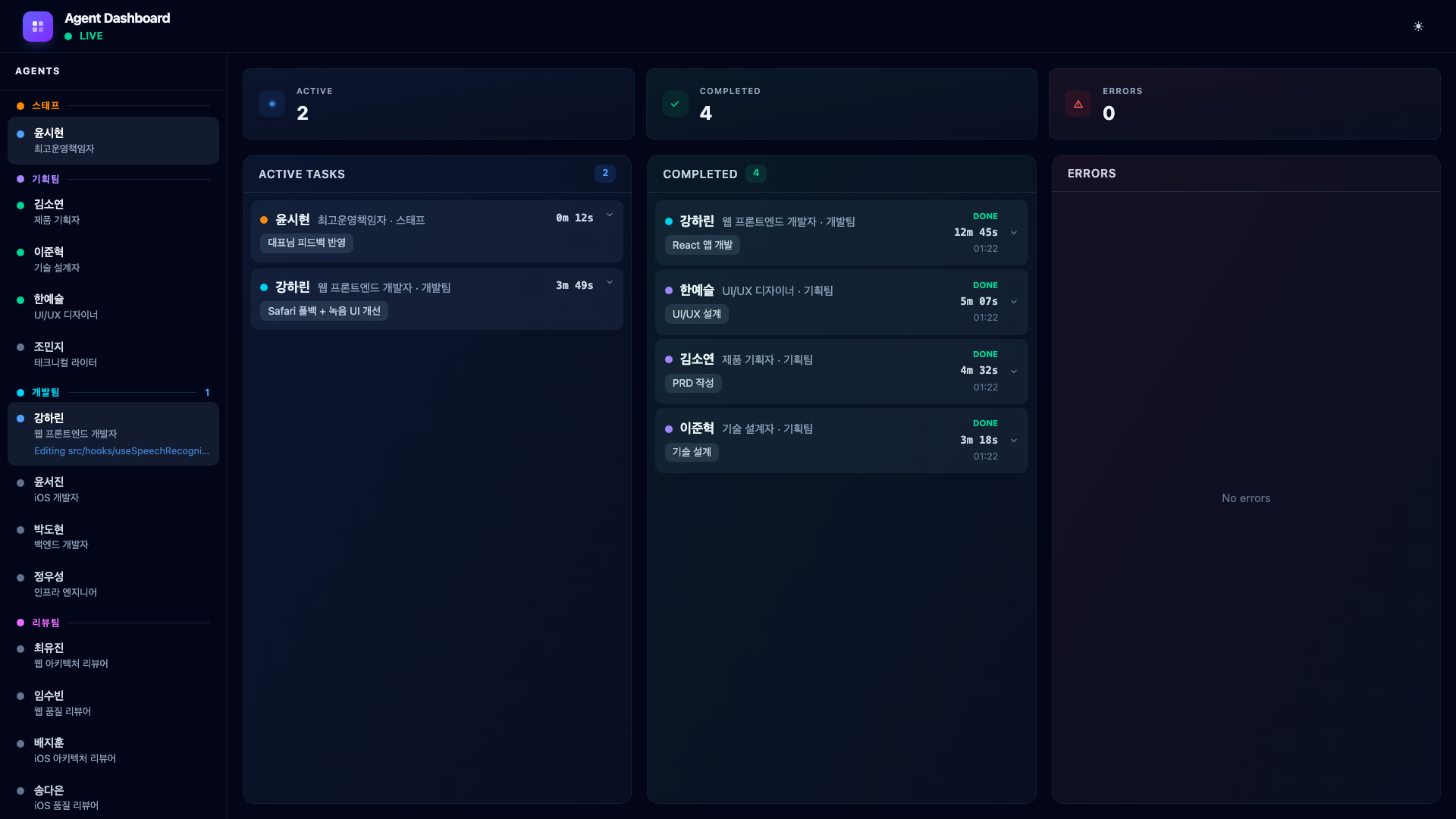
This cycle – build, test, give feedback, fix – happens multiple times during any real project. The dashboard makes it visible: you can see the COO processing the new instructions and the developer being re-assigned. The Completed column accumulates each iteration, giving you a history of how the product evolved through feedback.
The key point: agentic coding is not type one prompt and get a perfect app. It is a conversation. The agents do the heavy lifting, but the human steers.
9.4. Phase 3 – Review (3 Agents in Parallel)
Three agents launch simultaneously: two reviewers examine the code from architecture and quality perspectives, and the security auditor performs a full audit.
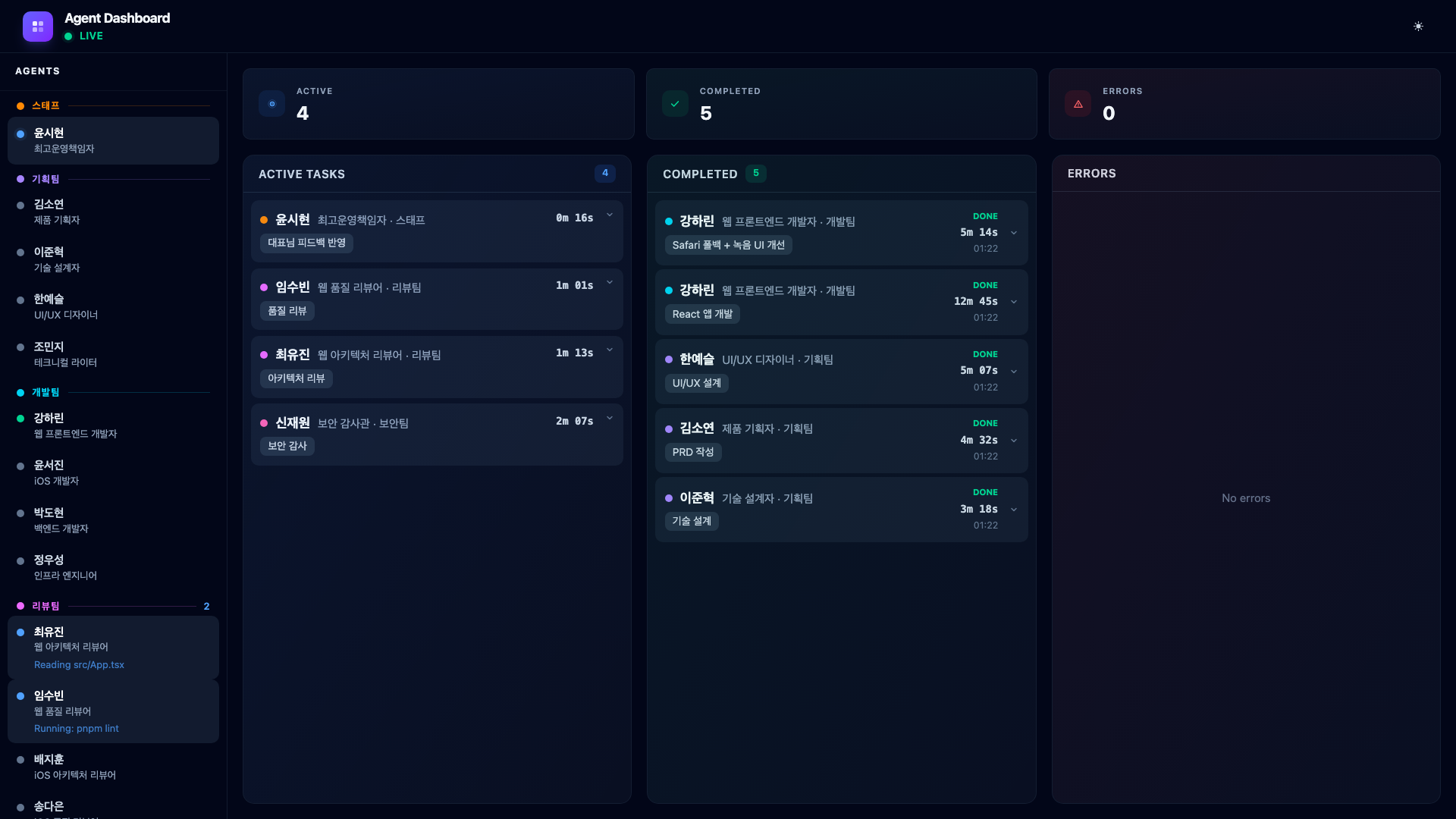
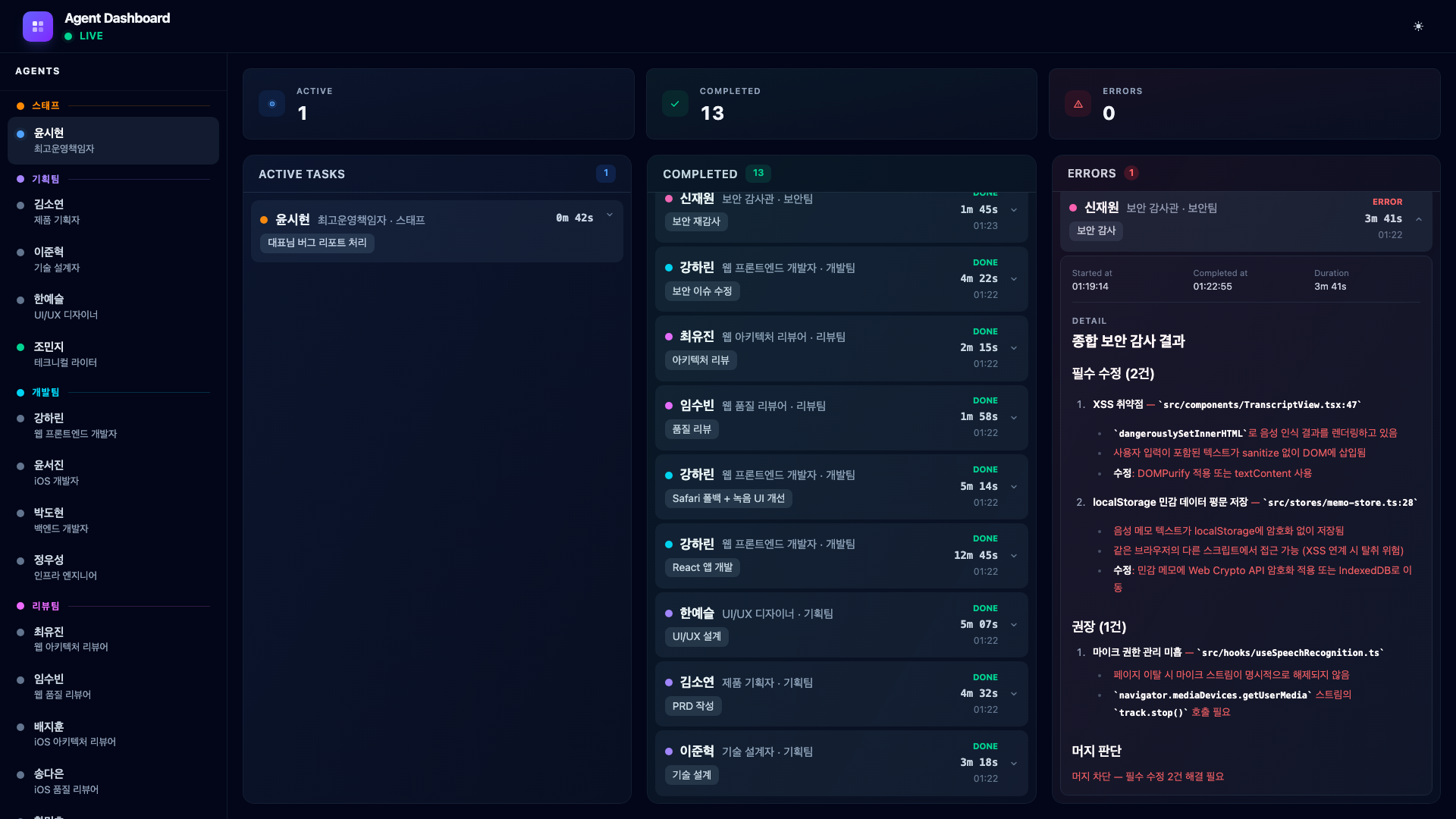
Then something happens. Security Auditor Shin Jaewon finds two issues – an XSS vulnerability in the transcript view and unencrypted memo data in localStorage. His card turns red and moves to the Errors column.
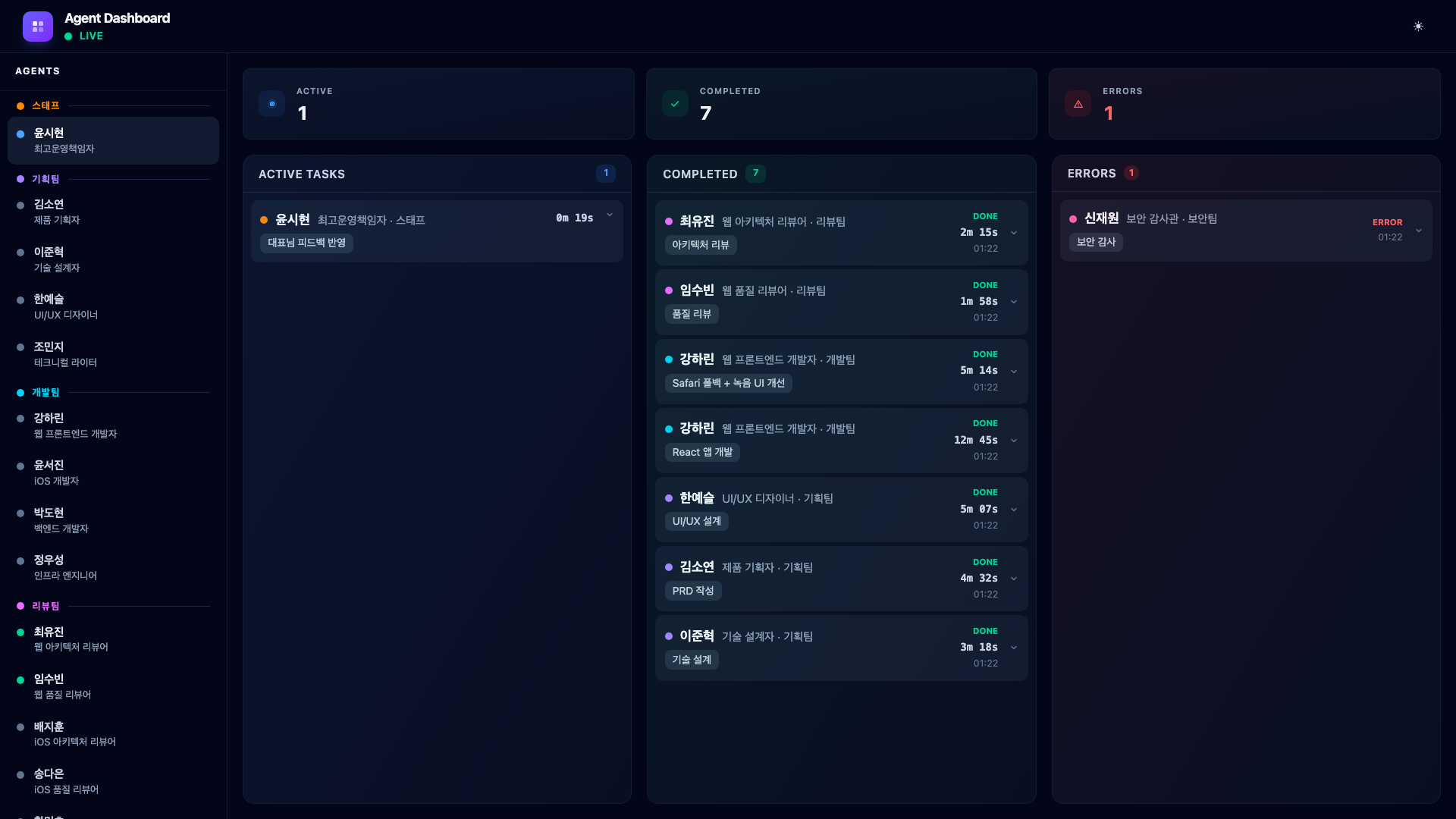
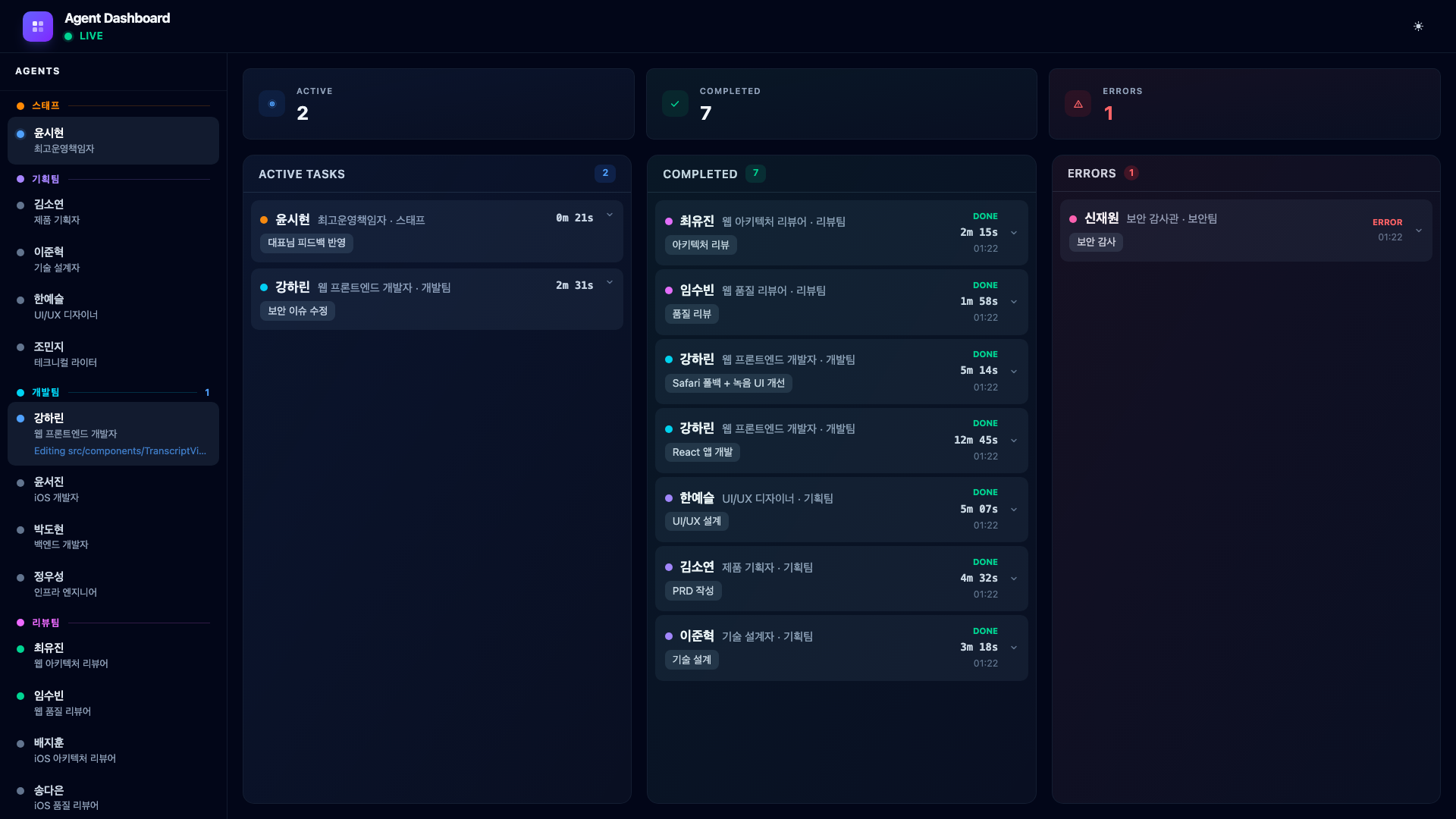
This is exactly the kind of event that would be easy to miss in a terminal-only workflow. The dashboard makes it impossible to ignore: the error counter increments, the card appears in the red Errors column, and the sidebar dot turns red.
The COO reads the error, dispatches Web Developer Kang Harin to fix it. She applies DOMPurify for XSS prevention and encrypts localStorage data with Web Crypto API. Her fix completes and shows in the Completed column.
9.5. Phase 4 – QA & Re-verification (2 Agents in Parallel)
With the security issue resolved, the COO launches QA testing and a security re-audit to verify the fixes. QA Engineer Oh Taeyun runs the full test suite while Security Auditor Shin Jaewon re-audits the patched code.
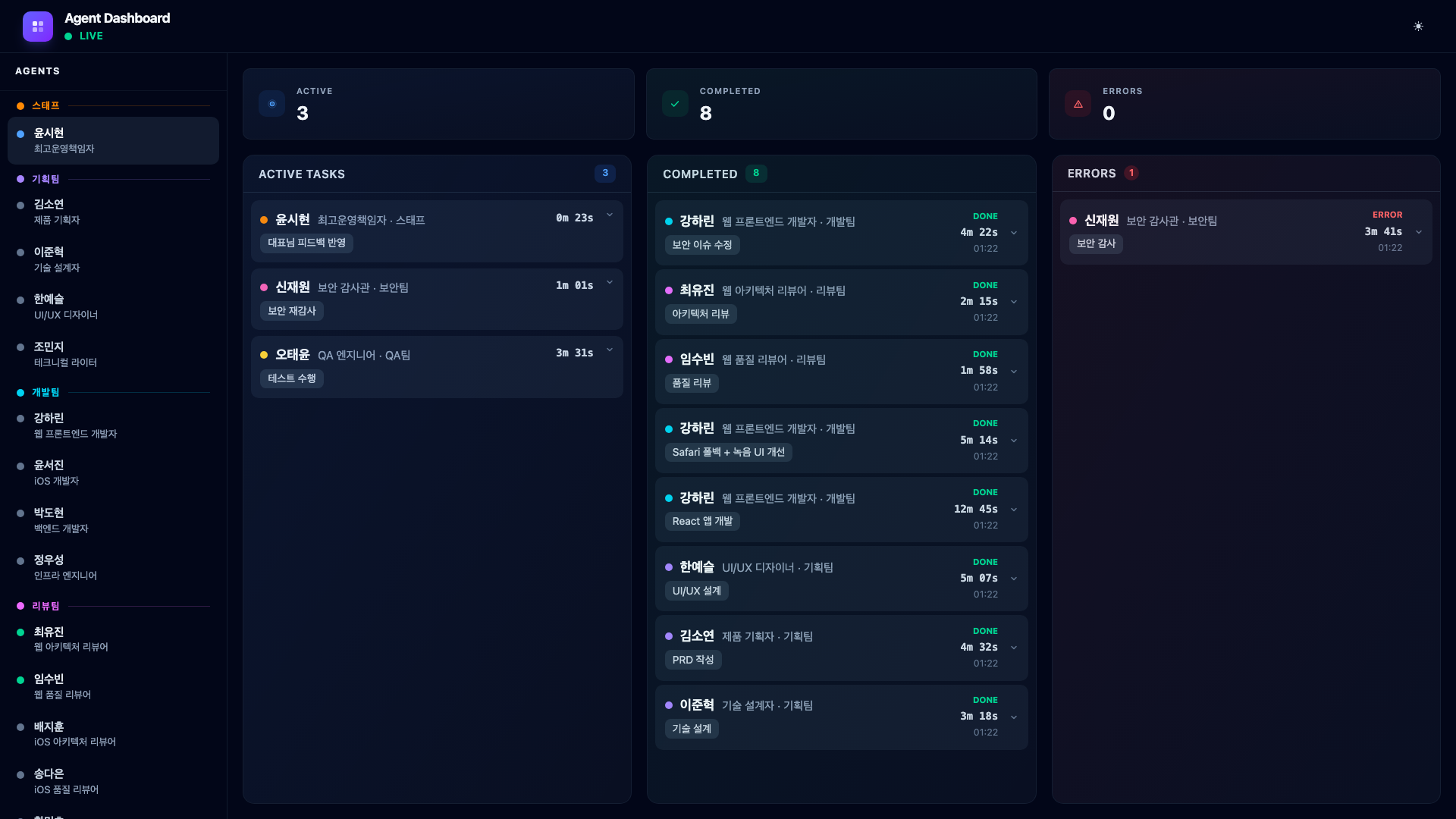
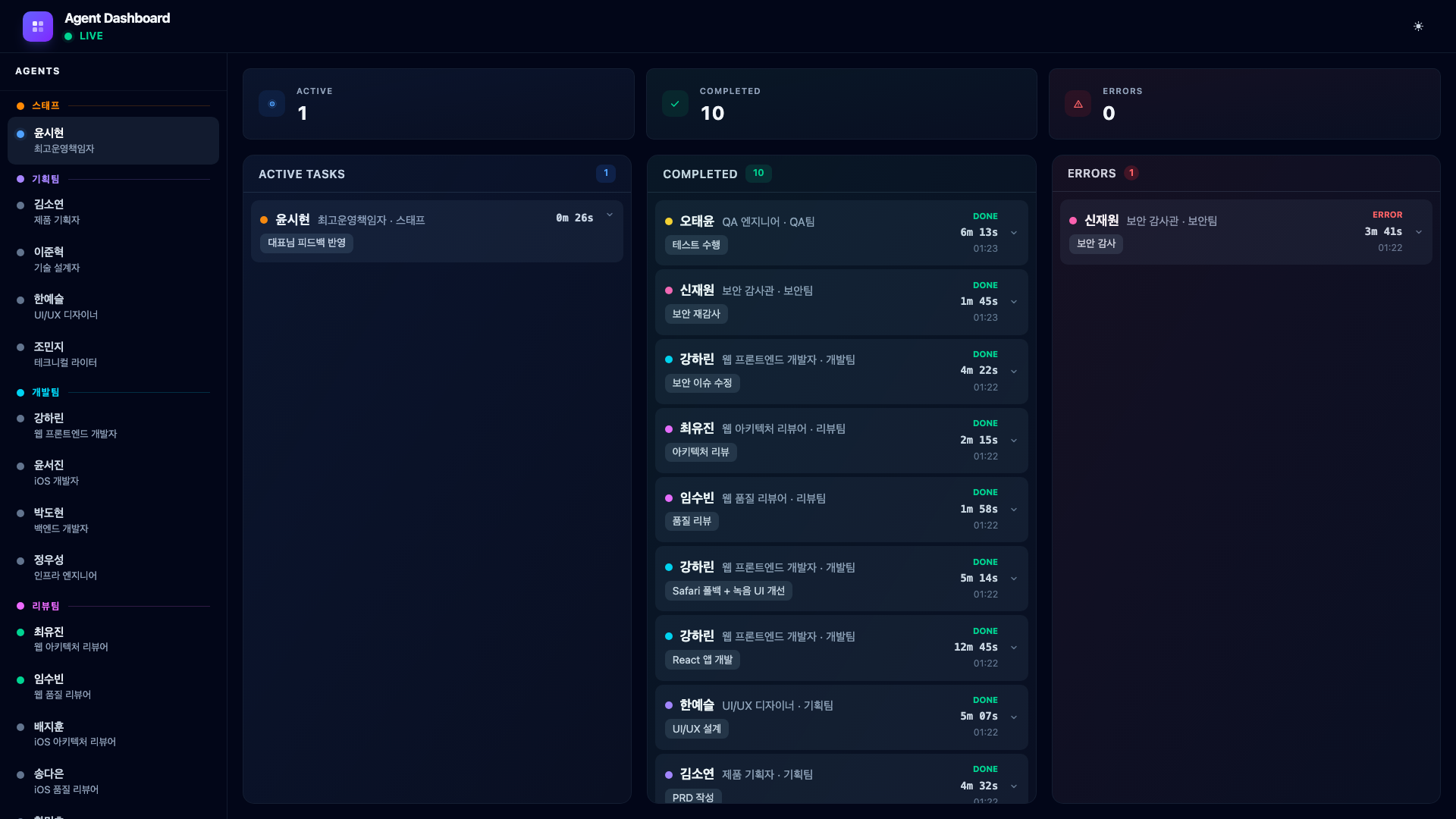
Both pass. The QA engineer confirms all 12 tests pass, and the security auditor verifies that the XSS vulnerability and localStorage encryption are properly fixed.
9.6. Bug Report – CEO Finds an Issue
After QA passes, I continue testing the app myself. I notice that when I switch to another browser tab during recording and come back, the waveform visualization freezes while the recording continues silently. I report this to Claude Code:
“When I switch to another tab during recording and come back, the waveform freezes. The recording keeps going but the waveform stops moving.”
The COO does not immediately dispatch a developer. Instead, it first asks QA Engineer Oh Taeyun to reproduce and confirm the bug.
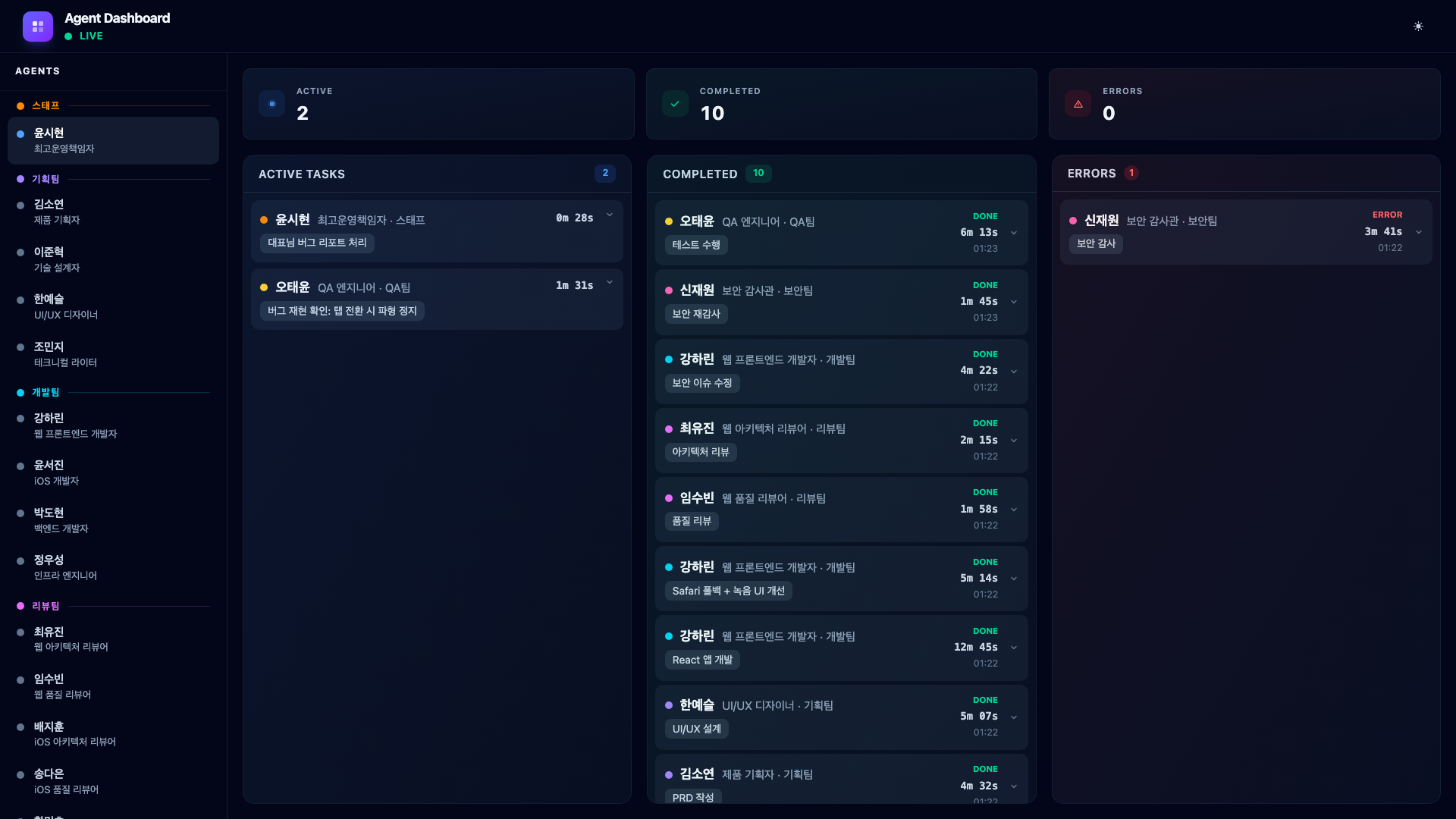
The QA engineer confirms: requestAnimationFrame stops in inactive tabs and does not restart on return. With the bug confirmed and root cause identified, the COO dispatches Web Developer Kang Harin to fix it.
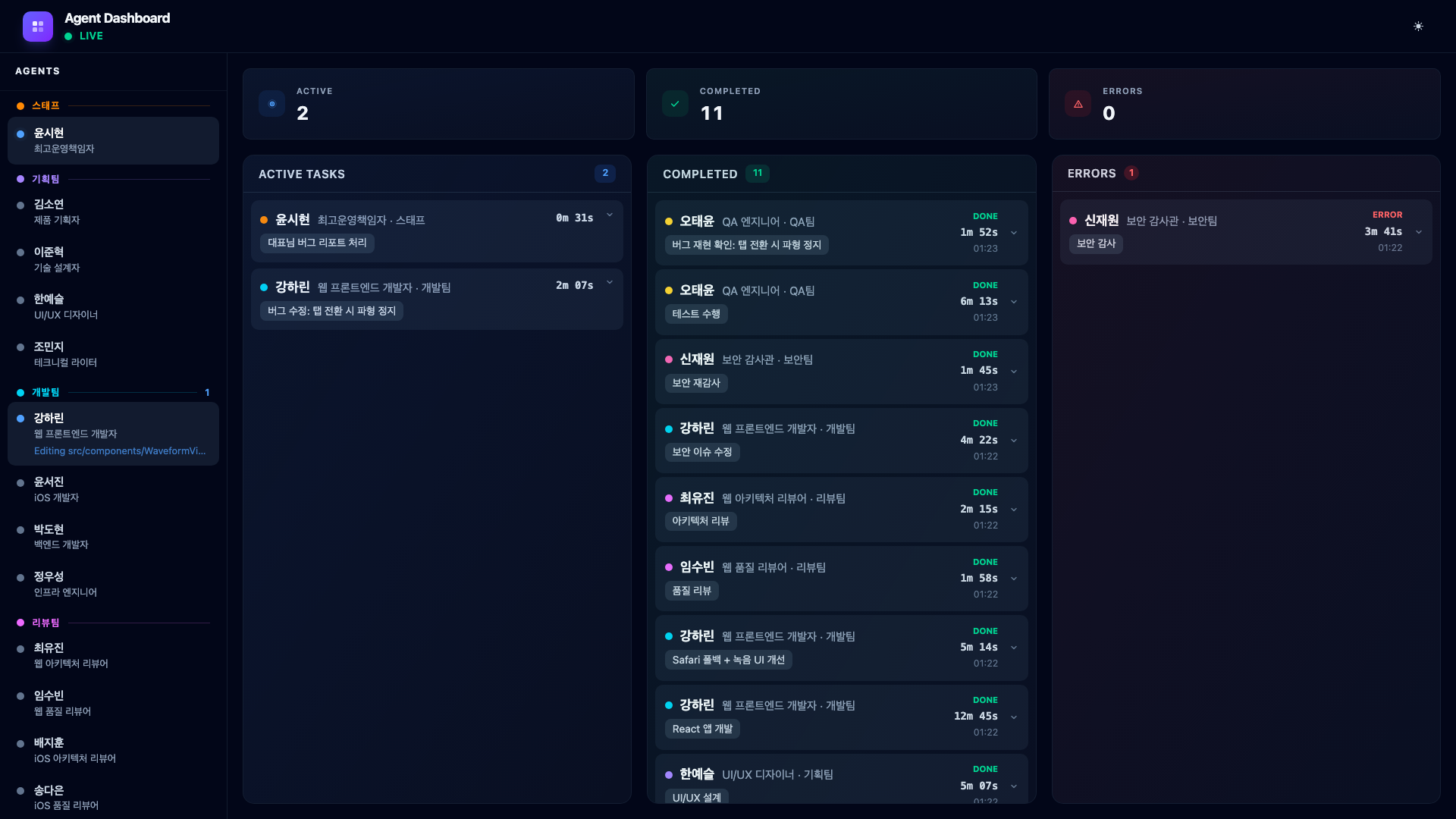
She adds a visibilitychange event listener to restart the animation loop when the tab becomes active again. A one-file fix, completed in under three minutes.
This is the real workflow: CEO reports → QA reproduces → developer fixes. Not a single prompt that magically produces a finished product.
9.7. Phase 5 – Documentation (1 Agent)
With all verification complete, the COO assigns one final task. Technical Writer Jo Minji documents the entire development process.
She reviews the outputs from every phase – the PRD, technical design, code changes, review findings, security fix, and QA results – then produces a blog post, updated README, CHANGELOG entries, and a hook configuration guide.
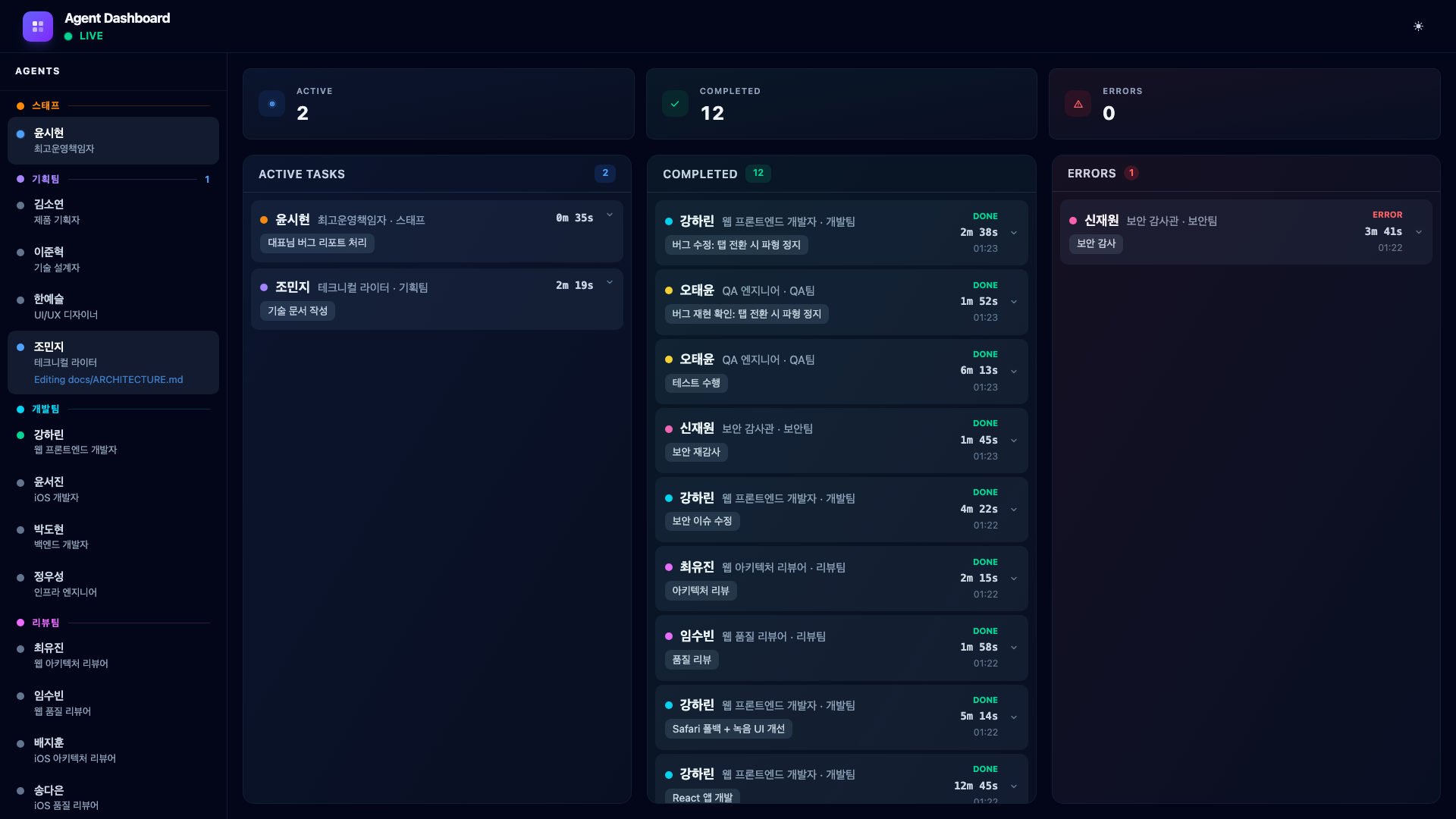
When the documentation is complete, her card moves to Completed with a full markdown summary of everything she produced.
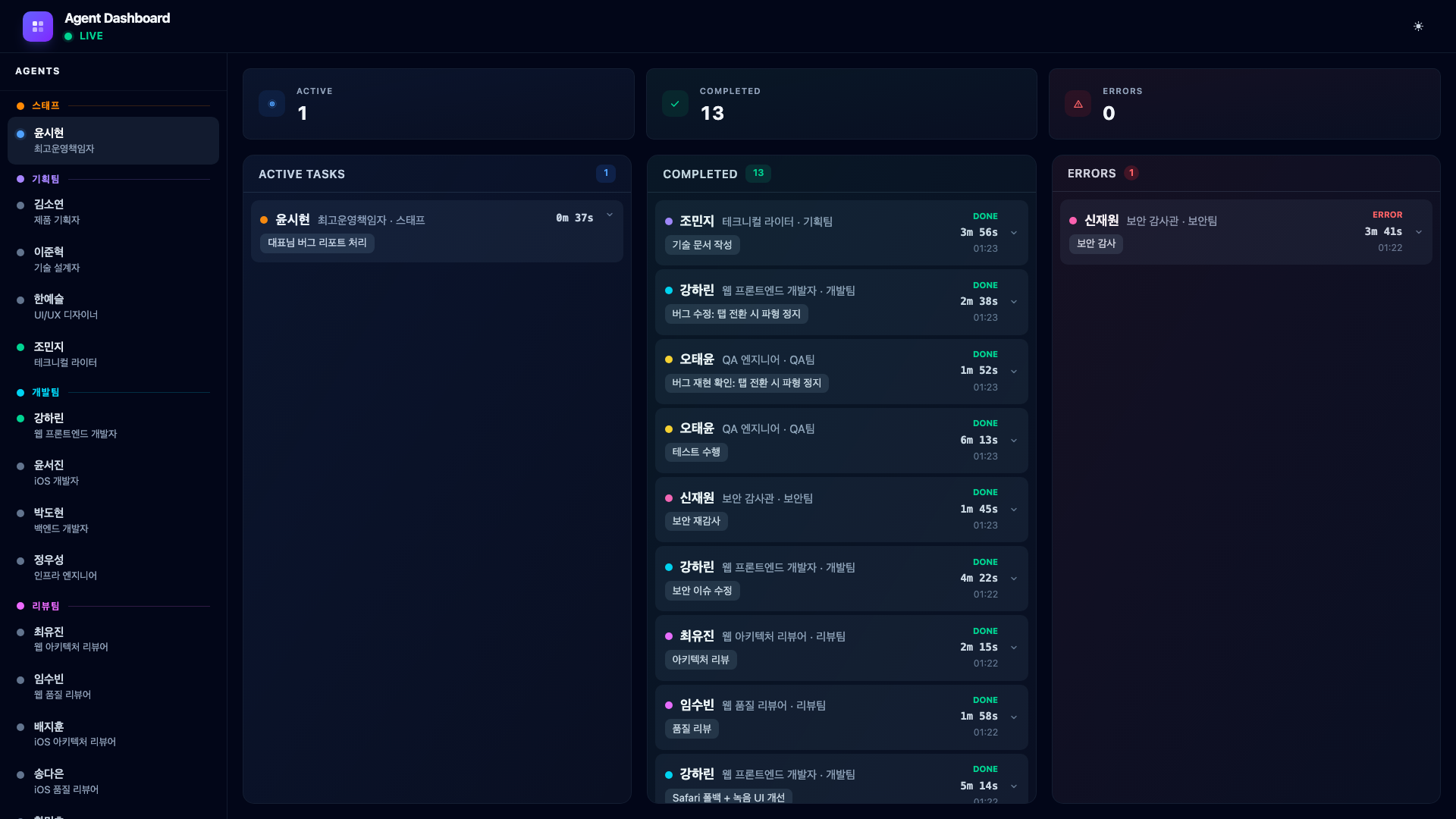
Here is what the generated technical design document looks like – a Confluence-style page with table of contents, architecture overview, data flow diagrams, and API specifications.
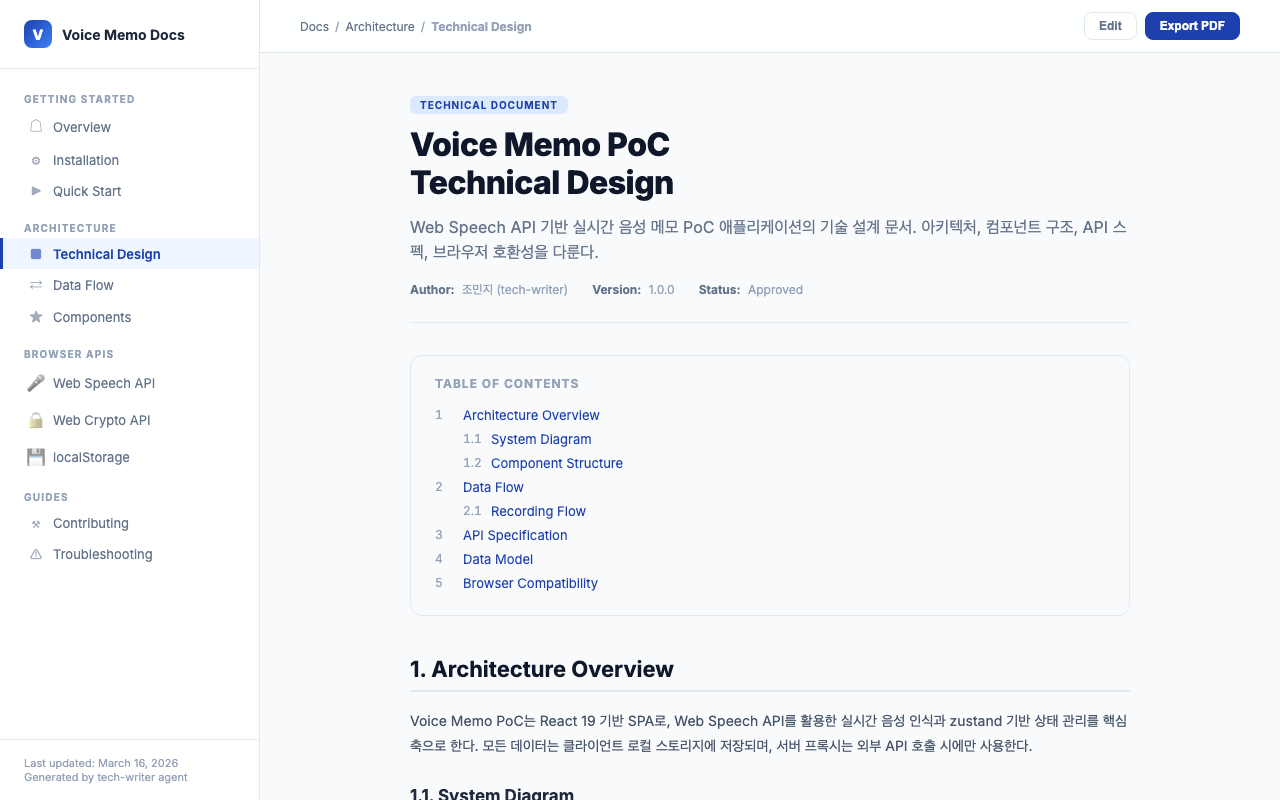
9.8. Expanding Completed Cards
Clicking a completed card expands it to show the full markdown output rendered with Tailwind Typography. Here is what the web developer’s completion card looks like – you can see the implementation summary, files changed, and test coverage.
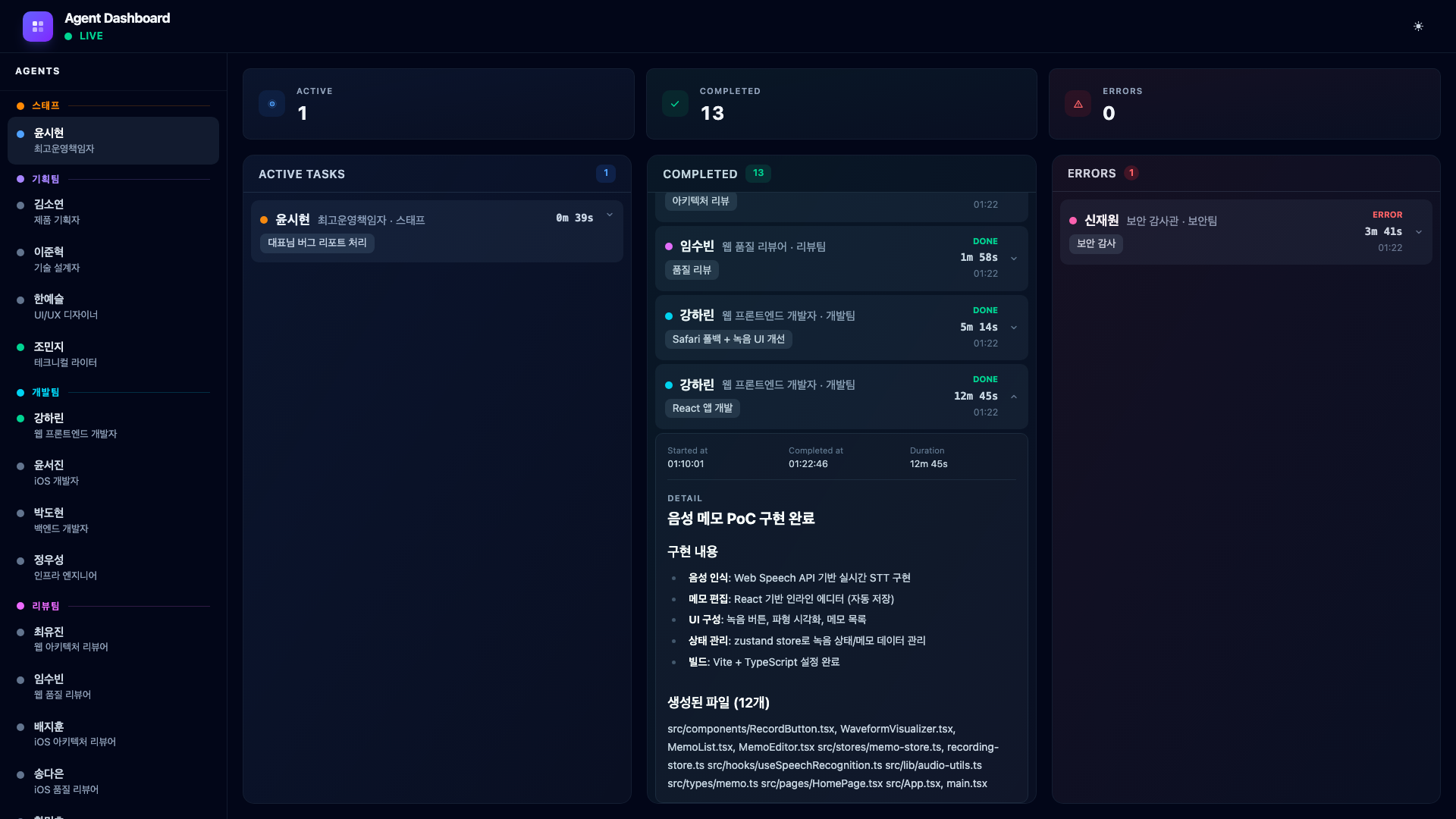
And here is the error card expanded, showing exactly what the security auditor found.
9.9. The Final Product
And this is the voice memo app the agents actually built – a fully functional PoC with real-time speech-to-text transcription, waveform visualization, and memo management.
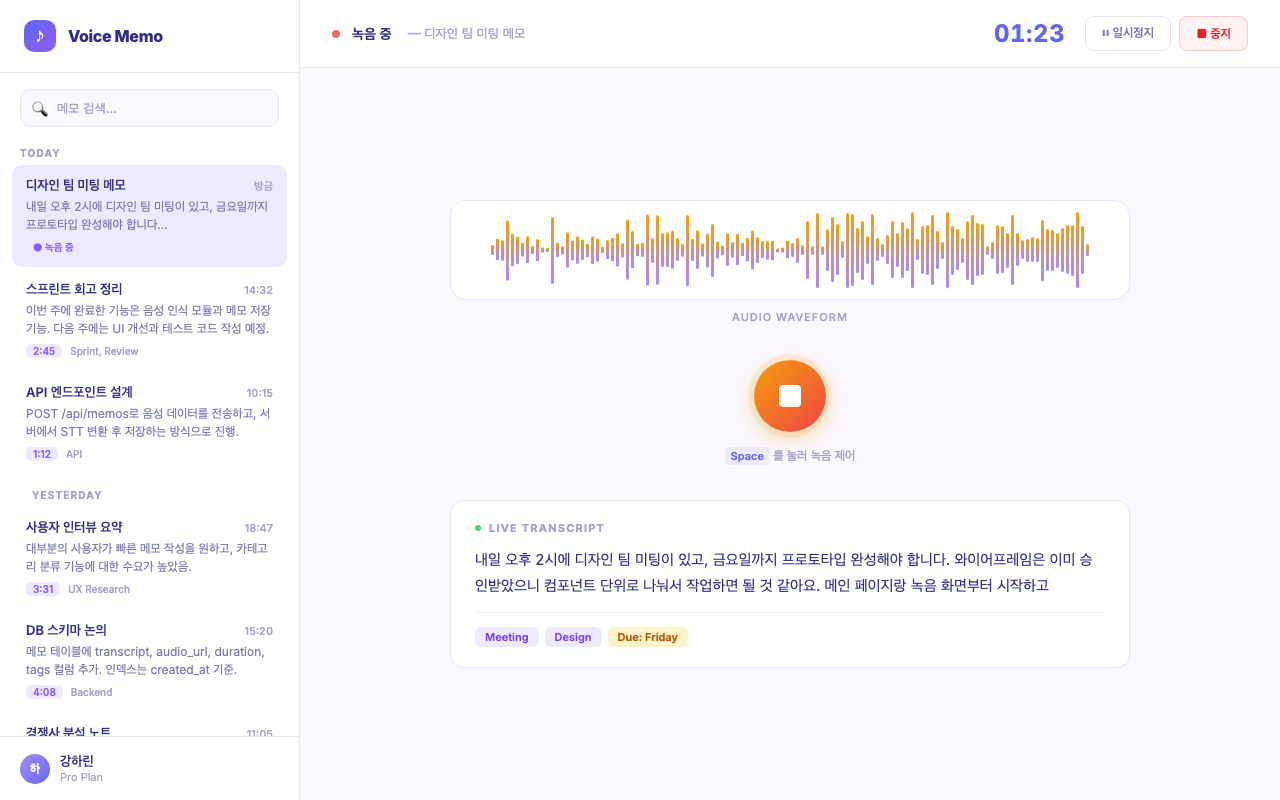
From a single prompt to a working application, with every phase visible on the dashboard in real time.
9.10. Full Pipeline Summary
The complete orchestration flow across all five phases.
CEO: “Build voice memo PoC” → COO: Analyze & Plan
| Phase | Agents |
|---|---|
| Phase 1: Planning | Kim Soyeon (PRD), Lee Junhyuk (TDD), Han Yeseul (Wireframes) |
| Phase 2: Development | Kang Harin (React SPA) |
| CEO Feedback | Kang Harin (Safari fallback + UI) |
| Phase 3: Review | Choi Yujin (Arch Review), Im Subin (Quality Review), Shin Jaewon (Security Audit) → ERR |
| Security Fix | Kang Harin (XSS fix + crypto) |
| Phase 4: QA & Recheck | Oh Taeyun (QA), Shin Jaewon (Security Re-audit) |
| Bug Fix (CEO report) | Oh Taeyun (Reproduce), Kang Harin (Fix waveform) |
| Phase 5: Documentation | Jo Minji (Blog, README, CHANGELOG) |
10. macOS Auto-Start with launchd
Since the dashboard server needs to be running before any Claude Code session starts, I set it up as a launchd service that starts automatically on macOS boot.
The project includes an install-launchd.sh script.
#!/bin/bash
set -euo pipefail

SCRIPT_DIR="$(cd "$(dirname "$0")" && pwd)"
PROJECT_DIR="$(dirname "$SCRIPT_DIR")"
PLIST_NAME="com.binaryloader.agent-dashboard"
PLIST_SRC="$PROJECT_DIR/$PLIST_NAME.plist"
PLIST_DST="$HOME/Library/LaunchAgents/$PLIST_NAME.plist"

# Build all packages
cd "$PROJECT_DIR"
pnpm build

# Copy plist with pnpm path substituted
PNPM_PATH=$(which pnpm)
sed "s|/path/to/pnpm|$PNPM_PATH|g" "$PLIST_SRC" > "$PLIST_DST"

# Load service
launchctl unload "$PLIST_DST" 2>/dev/null || true
launchctl load "$PLIST_DST"
After running scripts/install-launchd.sh, the dashboard server starts on every login. Logs go to /tmp/agent-dashboard.log. The server builds the client into static files and serves them from the same port, so http://localhost:3100 gives you both the API and the dashboard UI.
To uninstall, it is a single command.
launchctl unload ~/Library/LaunchAgents/com.binaryloader.agent-dashboard.plist \
  && rm ~/Library/LaunchAgents/com.binaryloader.agent-dashboard.plist
11. Lessons Learned
11.1. Know When to Pivot
The 2D virtual office was a creative exploration. It had genuine charm – watching agents walk to the cafeteria, seeing them scratch their heads on errors, and celebrating completions with confetti were all satisfying. But charm is not the same as utility. The moment I realized I was squinting at pixel sprites trying to figure out which agent was active, I knew the concept was wrong for the use case.
The entire process – from the initial Gather Town-style monitoring build to the finished dashboard – took about 9 hours starting on a Saturday night. The server architecture was already solid, so the presentation layer swap was fast. The lesson: build the infrastructure generically enough that the presentation layer can change without rewriting the data pipeline.
11.2. Hook System Limitations and Workarounds
Claude Code’s hook system is powerful but not designed for monitoring dashboards. The key gap is context: hooks tell you what happened (an agent started, a tool was used) but not why (what was the agent asked to do). The task-assign pattern fills this gap elegantly, but it requires discipline in the orchestration layer. Every agent invocation must be preceded by a task-assign call.
Encoding this as a rule in ~/.claude/rules/workflow.md made it automatic. The COO always pre-registers tasks because its instructions say so. No manual discipline required.
A later improvement eliminated the manual step entirely: the server now intercepts PreToolUse events for the Agent tool and auto-registers task descriptions, making the workflow rule redundant.
11.3. Real-Time WebSocket Changes Everything
The difference between polling-based monitoring and WebSocket push is not just technical – it changes how you interact with the system. With real-time updates, you can watch the dashboard while agents work. You see the exact moment an error occurs. You see agents transition from working to completed in real time. It transforms the experience from “check periodically” to “glance and know”.
11.4. Korean Names Add Personality
This one is subjective, but giving agents Korean names made the entire experience more engaging. Reading “Security Auditor Shin Jaewon found an XSS vulnerability” is more memorable than “security-auditor found an XSS vulnerability”. It turns abstract tool usage into something that feels like team coordination.
The names also help in conversation with Claude Code. When the COO says “dispatching Product Planner Kim Soyeon for market research”, it reads like a natural delegation rather than a function call.
12. Honest Assessment – Is This Production-Ready?
No. Let me be clear about that.
The output from a multi-agent pipeline is rough. The code works, but it is not polished. You will find inconsistent naming, missing edge cases, and UI details that no human developer would ship without a second pass. The security auditor catches the obvious vulnerabilities, but subtle architectural issues can slip through. The QA engineer runs tests, but coverage is not comprehensive.
The code agents generate does not work cleanly on the first run. You will encounter broken import paths, type mismatches, and browser-specific errors that only surface when you actually open the app. Fixing these small bugs still falls on the human. You can send them back to the agent – “this doesn’t work, fix it” – and it will, but that back-and-forth cycle itself takes time. At this stage, an agent pipeline is closer to a first draft generator than a finished product machine.
This is a PoC tool, and it excels at that. When you need to explore an idea quickly – validate a concept, build a demo for a stakeholder meeting, or prototype a feature before committing engineering resources – this workflow gets you there in hours instead of days. The agents handle the mechanical work: scaffolding, boilerplate, basic tests, documentation. You handle the judgment calls: is this the right architecture, does the UX make sense, should we even build this.
The key insight is knowing where the boundary lies. Use agent teams to generate the first 80%. Then apply human expertise for the remaining 20% that requires taste, context, and domain knowledge that no AI currently possesses.
13. Closing Thoughts
Building this dashboard forced me to confront a question that keeps coming up: what does software development look like when AI agents handle most of the implementation work?
The traditional development workflow – write specs, assign tickets, code review, QA, deploy – is already shifting. In this project, a single person orchestrated 19 agents through a multi-phase pipeline that would normally require a cross-functional team. The planning, coding, reviewing, testing, and documentation all happened in one session, visible on one screen.
This does not mean developers become obsolete. If anything, the role shifts upward. You spend less time writing code and more time making decisions: which architecture fits, which tradeoff to accept, when the output is good enough. The agents are fast but lack judgment. The human is slow but provides direction. The combination is more productive than either alone.
Anthropic’s CEO Dario Amodei recently stated that AI will handle most coding within three to six months. It does not sound entirely far-fetched anymore. But two practical hurdles remain. First, cost – running AI agents at scale is not cheap, and whether the operational expense can compete with human developer salaries at production volumes is still an open question. Second, quality – the code agents produce today is functional but rough. Small bugs, broken imports, browser-specific edge cases. The “fix it, no wait fix it again” cycle eats into the time savings. Complete replacement feels premature; powerful accelerator feels accurate.
Still, the direction itself is hard to deny. I wrote more about where this trend might lead in [Column] ‘We Can’t Build It Without a Developer’ No Longer Holds. The short version: the demand for people who can code is not disappearing, but the definition of coding is expanding. Steering a team of AI agents is still software engineering. It just looks different from what we are used to.
These are interesting times.


Leave a comment