
Overview
This post covers how to handle the default Modal Presentation Style change introduced in iOS 13.
Disclaimer
This article was built and tested on the Xcode 11 GM version. The behavior described here may differ in the official release version.
Introduction
In the iOS 13 SDK, a new case called automatic was added to UIModalPresentationStyle. The default value was also changed from fullScreen to this new automatic case. As a result, additional code is now required to provide the same full-screen Modal Presentation Style as before.
Personally, while I understand to some extent that Apple is pushing the card-style UI as a trend, I find it unfortunate that changing the default value of the iOS SDK has a negative impact on how developers perceive the iOS SDK.
For new projects, adapting the UI/UX for the card-style presentation would be relatively straightforward. However, for existing projects that already have their UI/UX implemented and optimized for the full-screen style, it is difficult to adapt to the new style immediately. Therefore, let’s explore whether we can still provide the fullScreen style in projects built with the iOS 13 SDK.
Steps
1. What Changed
Let’s first take a look at the actual Modal Presentation Style change on a device.
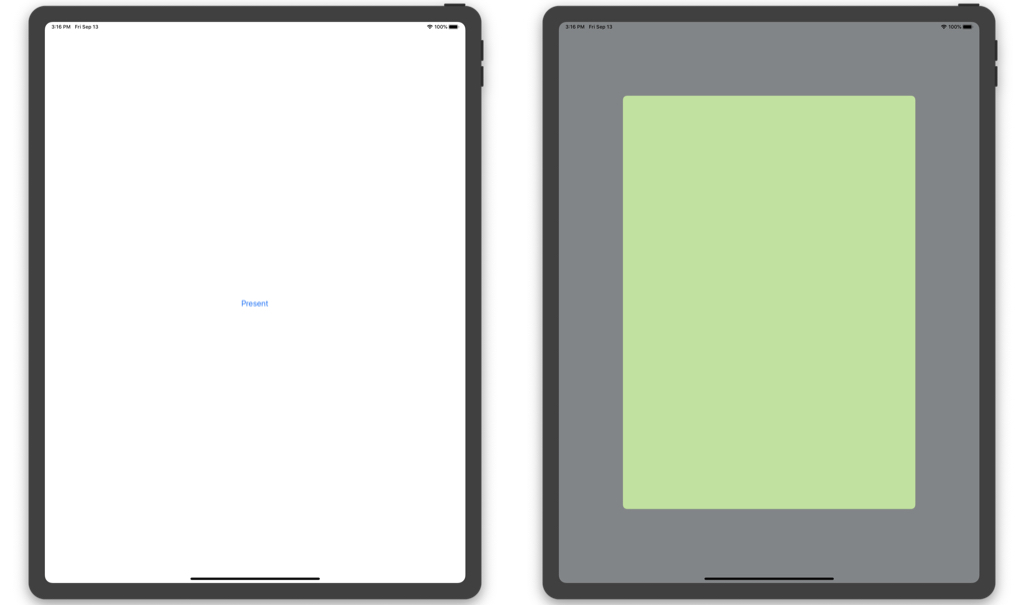 Xcode 11 GM / iPad Pro 3rd Gen 12.9 / iOS 13
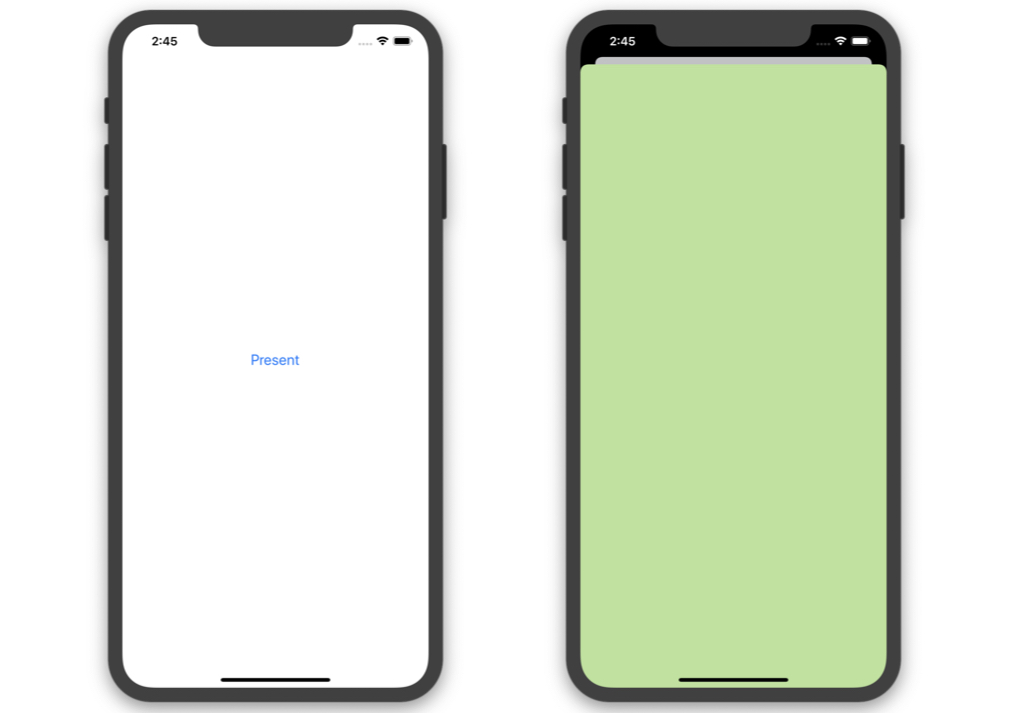 Xcode 11 GM / iPhone 11 Pro / iOS 13
I implemented a present button on the white background view controller on the left. Pressing it presents a new view controller with a green background. Instead of the presented view controller covering the entire screen as before, the existing view controller dims and scales down while the new view controller slides up as a card form partially covering it. It also supports dismiss interaction through a pull-down gesture. Whether this system-provided gesture and interaction can actually be used in production is uncertain. I’m curious whether designers would actually approve of the system default interaction.
2. Reading the Developer Documentation
The card-style UI looks nice and all, but we need to provide the full-screen style for now, so let’s read Apple’s developer documentation first.
A quick scan suggests that if modalPresentationStyle is not explicitly specified, the system decides whether to provide full screen or another presentation option based on Size Classes.
Since Apple’s developer documentation occasionally contains inaccurate information, I know all too well that examining the UIViewController header directly is the best path to peace of mind. Let’s take a look.
public enum UIModalPresentationStyle : Int {

    case fullScreen

    ...

    @available(iOS 7.0, *)
    case none

    @available(iOS 13.0, *)
    case automatic
}
Looking at the UIModalPresentationStyle enum definition, we can confirm the addition of the automatic case. Additionally, the comments on the modalPresentationStyle instance property declaration explain the related behavior. The key points are summarized below:
- modalPresentationStyle defines the style used when a view controller is presented modally.
- This property should be set on the view controller being presented, not the presenting controller.
- If this property is set to automatic, it is always resolved to a concrete style.
- By default,
automaticis interpreted aspageSheet. - The default value is
automaticfrom iOS 13.0 onwards, andfullScreenfor earlier versions.
Now that we’ve gathered enough background information for debugging, let’s proceed with debugging and modify the behavior to display as fullScreen like in pre-iOS 13 versions.
3. Debugging
Let’s verify whether the default value of UIModalPresentationStyle was indeed changed to automatic in the iOS 13 SDK (Xcode 11, to be precise), as stated in Apple’s developer documentation.
Set a breakpoint at an appropriate location and execute the following LLDB debugging command.
(lldb) po viewController.modalPresentationStyle.rawValue
Result: 1
I expected -2, the rawValue of automatic, but got 1 instead. The same value of 1 is returned on iPad as well. I initially thought it was a bug in the Xcode 11 GM version, but it appears that the value was resolved to an appropriate style based on Size Classes, as described in the developer documentation.
4. A Quick Fix
There are three main approaches to change the modal style from pageSheet (due to the default value change) back to fullScreen:
- Method swizzling of UIViewController’s present-related methods
- Setting modalPresentationStyle to
fullScreenat each individual call site - Implementing a method that presents modals in
fullScreenstyle
Approach 1, method swizzling, is risky because it affects the entire app lifecycle and even system-invoked calls, potentially causing side effects. Personally, I tend to avoid method swizzling when other alternatives exist, so I’ll pass on this one.
Approach 2, setting modalPresentationStyle to fullScreen at each call site, is the safest with zero side effects. However, it scatters the code and could become legacy code that needs to be removed later, so I’ll pass on this one as well.
Approach 3, implementing a method that presents modals in fullScreen style, is the most practical compromise. Developers who want the full-screen modal style can use this method to solve the problem.
5. Writing the Code
In the real world, since development is a team effort, it’s important to handle foreseeable side effects and edge cases beyond the immediate problem as much as possible.
The most basic side effect we can predict when implementing the method mentioned above is when an external caller sets a modalPresentationStyle other than fullScreen before calling the method. For example, if someone sets overCurrentContext and then calls our method, the modal would unexpectedly appear in fullScreen style instead of the intended behavior. Through reading Apple’s developer documentation and debugging, we’ve clearly identified the condition we need to filter: only change to fullScreen when the style is pageSheet. Let’s write the code.
extension UIViewController {

    func present(to viewController: UIViewController, animated: Bool, completion: (() -> Void)? = nil) {
        defer {
            present(viewController, animated: animated, completion: completion)
        }

        guard #available(iOS 13.0, *) else { return }

        let targets: [UIModalPresentationStyle] = [.pageSheet]
        guard targets.contains(viewController.modalPresentationStyle) else { return }

        viewController.modalPresentationStyle = .fullScreen
    }

}
Using an extension, we added a method to UIViewController that presents modals in fullScreen style. The code only changes to fullScreen when the runtime environment is iOS 13 or later and the view controller’s modalPresentationStyle is pageSheet.
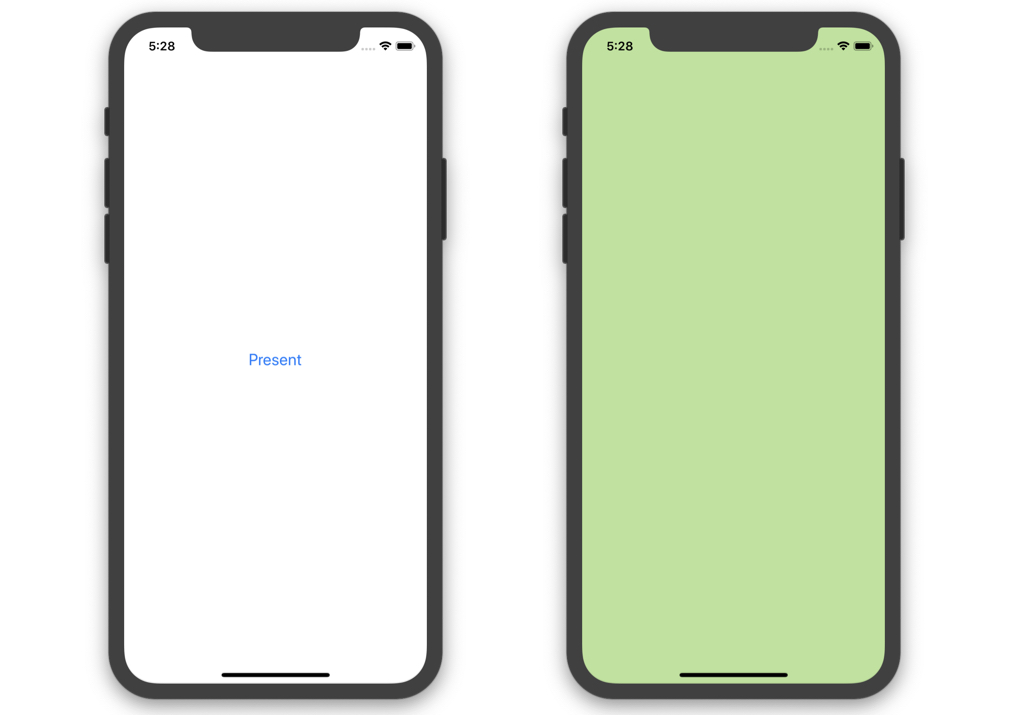 Xcode 11 GM / iPhone 11 Pro / iOS 13
Running it confirms that the modal is now presented in full-screen style. Eventually, the UI/UX should be updated to accommodate the pageSheet style, but for now, this approach serves as a reasonable solution.



Leave a comment