
Overview
Sharing the experience of building a macOS menu bar app that monitors Claude Code’s own usage — using Claude Code itself.
Background
While using the Claude Code Max plan, I often wondered how many tokens I’d consumed in the current session or how many messages I’d sent. Checking the usage page in a browser every time was cumbersome.
Claude Code stores daily usage data locally in ~/.claude/stats-cache.json. The idea was simple: read this file and display the stats in the menu bar so they’re always visible.
And here’s the twist — this app itself was built entirely with Claude Code. Claude Code building an app to monitor its own usage.
Data Sources
The app reads two local JSON files that Claude Code maintains.
| File | Purpose |
|---|---|
~/.claude/stats-cache.json |
Daily messages/tokens/sessions/tool calls, per-model cumulative tokens |
~/.claude.json |
Account name, plan type (Pro/Max) |
The structure of stats-cache.json looks like this:
{
  "dailyActivity": [
    {
      "date": "2026-02-14",
      "messageCount": 2511,
      "sessionCount": 9,
      "toolCallCount": 537
    }
  ],
  "dailyModelTokens": [
    {
      "date": "2026-02-14",
      "tokensByModel": {
        "claude-opus-4-6": 65342,
        "claude-sonnet-4-5-20250929": 11726
      }
    }
  ],
  "modelUsage": {
    "claude-opus-4-6": {
      "inputTokens": 15389,
      "outputTokens": 282180,
      "cacheReadInputTokens": 251600374,
      "cacheCreationInputTokens": 5266604
    }
  },
  "totalSessions": 28,
  "totalMessages": 8789,
  "longestSession": { "duration": 27382247, "messageCount": 85 },
  "firstSessionDate": "2026-02-08T14:38:23.545Z"
}
Tech Stack
The project uses only Swift Package Manager — no Xcode project file needed.
- SwiftUI + MenuBarExtra (macOS 14+,
.windowstyle) - @Observable macro + @MainActor
- DispatchSource file watching
- No external dependencies
// swift-tools-version: 5.10
import PackageDescription

let package = Package(
    name: "ClaudeUsageMeter",
    platforms: [.macOS(.v14)],
    targets: [
        .executableTarget(
            name: "ClaudeUsageMeter",
            path: "Sources"
        )
    ]
)
Key Implementation Details
1. MenuBarExtra
Starting with macOS 14, SwiftUI’s MenuBarExtra enables building native menu bar apps. The .window style shows a popover window on click.
@main
struct ClaudeUsageMeterApp: App {
    @State private var viewModel = UsageViewModel()

    var body: some Scene {
        MenuBarExtra {
            PopoverContentView(viewModel: viewModel)
        } label: {
            MenuBarLabel()
        }
        .menuBarExtraStyle(.window)
    }
}
2. DispatchSource File Watching
To refresh the UI immediately when stats-cache.json changes, the app watches file system events via DispatchSource. A 60-second timer serves as a fallback.
final class FileWatcher {
    private var source: DispatchSourceFileSystemObject?

    func start() {
        let fd = open(path, O_EVTONLY)
        guard fd >= 0 else { return }

        let source = DispatchSource.makeFileSystemObjectSource(
            fileDescriptor: fd,
            eventMask: [.write, .rename, .delete],
            queue: .main
        )
        source.setEventHandler { [weak self] in
            self?.onChange()
        }
        source.setCancelHandler { close(fd) }
        self.source = source
        source.resume()
    }
}
3. Creating the .app Bundle
To package an SPM binary as a macOS app bundle, you need to manually create the directory structure with an Info.plist. Setting LSUIElement to true makes it a menu-bar-only app that doesn’t appear in the Dock.
ClaudeUsageMeter.app/
├── Contents/
│   ├── Info.plist
│   ├── MacOS/
│   │   └── ClaudeUsageMeter
│   └── Resources/
│       └── AppIcon.icns
<key>LSUIElement</key>
<true/>
Lessons Learned
1. Server-Side Usage Data Is Inaccessible
Initially, I planned to show a progress bar visualizing daily usage against the plan limit. However, the usage percentages shown on the web (e.g., “current session 5%, weekly 10%”) are computed server-side, and there’s no public API to fetch them.
Anthropic does offer a Usage & Cost API, but it requires an organization Admin API key (sk-ant-admin...) and tracks different metrics from the per-plan session/weekly limits.
I ended up removing the progress bar and focusing on data that stats-cache.json reliably provides — messages, tokens, sessions, and per-model breakdowns.
2. macOS Icon Cache
I generated the app icon programmatically with a Swift script. After changing the icon, macOS’s icon cache prevented it from updating. Re-registering the app with lsregister and restarting Finder and Dock was necessary.
/System/Library/Frameworks/CoreServices.framework/Frameworks/LaunchServices.framework/Support/lsregister -f ClaudeUsageMeter.app
killall Finder Dock
Result
From planning to implementation, icon generation, and GitHub push — all completed in a single session. The final project structure:
Sources/
├── App/
│   └── ClaudeUsageMeterApp.swift
├── Models/
│   ├── StatsCache.swift
│   ├── ClaudeConfig.swift
│   └── UsageSnapshot.swift
├── Services/
│   ├── StatsLoader.swift
│   └── FileWatcher.swift
├── ViewModels/
│   └── UsageViewModel.swift
└── Views/
    ├── MenuBarLabel.swift
    ├── PopoverContentView.swift
    ├── HeaderView.swift
    ├── TodayStatsSection.swift
    ├── DailyTrendSection.swift
    ├── ModelBreakdownSection.swift
    └── CumulativeStatsSection.swift
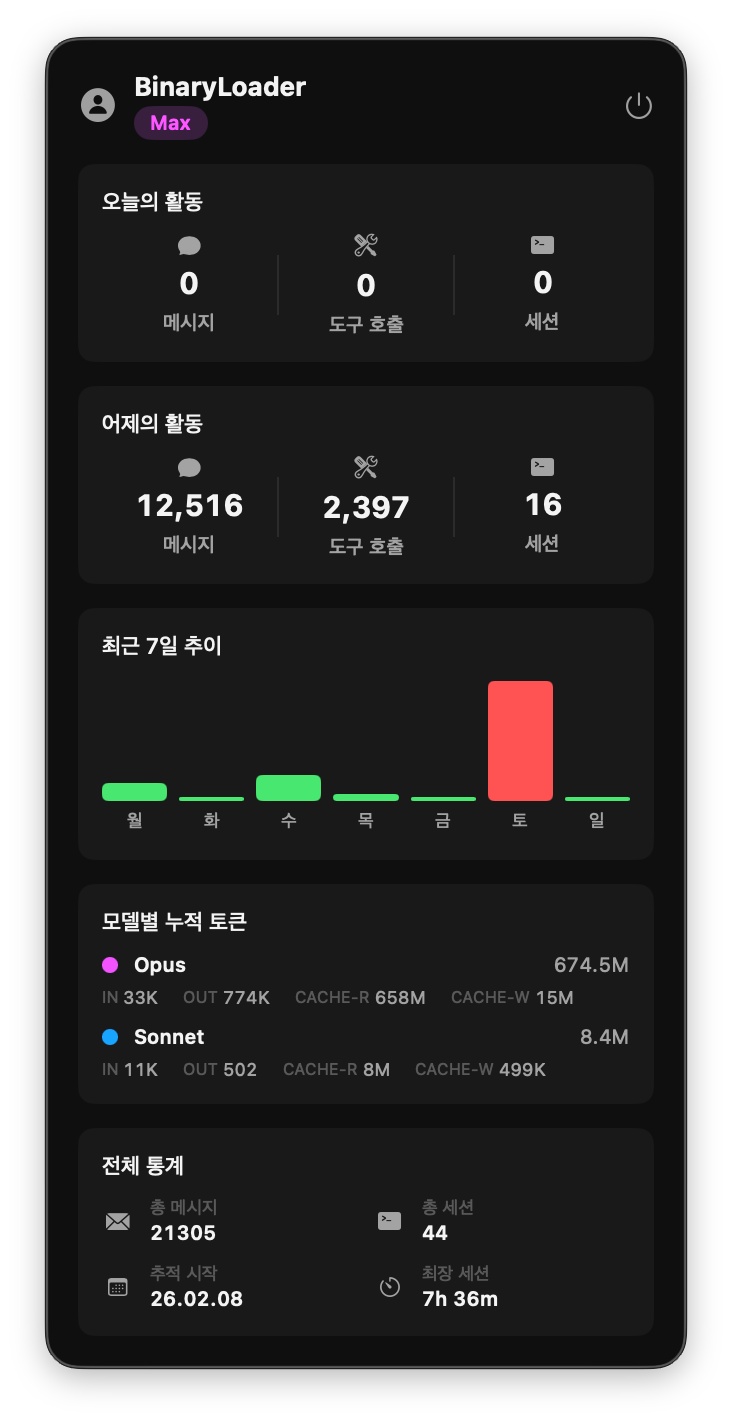
Clicking the menu bar icon reveals account info, today’s activity, a 7-day trend chart, per-model token usage, and cumulative statistics at a glance.
For the record, the only thing a human did in this project was say “build this.” App development, GitHub repo creation, icon generation — Claude Code handled all of it. My sole contribution was sitting nearby and occasionally saying “that’s not right.”



Leave a comment