
Overview
This post covers how to create and distribute a custom fastlane Plugin.
Steps
1. Plugin Example
2. Generating a Plugin Template
fastlane new_plugin
- Plugin naming should follow formats like
testflightorupload_to_s3.
Would 'hacoma_' be okay to use for your plugin name?
- If the name contains the word
plugin, it will be stripped as shown above, so be careful. - Example: If you enter hacoma_plugin as the name, it will be changed to hacoma_.
Please enter a short summary of this fastlane plugin:
- Write a brief description of the Plugin.
- The entered string is used in the following places:
spec.summaryin the fastlane-plugin-[plugin_name].gemspec fileAbout [plugin_name]in the README.md fileself.descriptionin the plugin_name_action.rb file
Please enter a detailed description of this fastlane plugin:
- Write a more detailed description of the Plugin.
- The entered string is used in the following place:
self.detailsin the plugin_name_action.rb file
3. Plugin Folder Structure
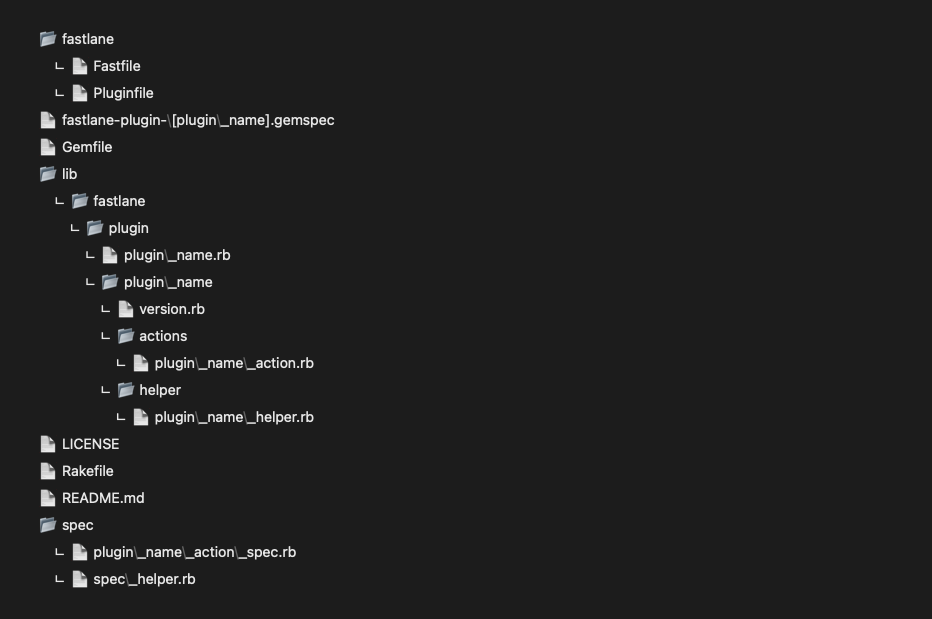
3.1. fastlane/Fastfile
- Provides test lanes to demonstrate the features and usage of the Actions included in the Plugin.
3.2. fastlane-plugin-[plugin_name].gemspec
- fastlane Plugins are distributed and versioned through gems, and all gem-related information is written in the
.gemspecfile. - Since the Plugin was created using a template, most of the information is already filled in. Uncomment
spec.homepageand enter the GitHub repository URL for the Plugin.
3.3. lib/fastlane/plugin/plugin_name/actions/plugin_name_action.rb
- Implement the Actions supported by the Plugin in this file.
- For how to implement Actions, refer to the [CI/CD] Creating a fastlane Action post.
- If you want the Plugin to support multiple Actions, add additional files in the same directory.
- Example: action1.rb, action2.rb, action3.rb, …
3.4. lib/fastlane/plugin/plugin_name/helper/plugin_name_helper.rb
- Implement utility functions used by Actions in this file. Methods implemented in the helper can be called from Actions.
- If supporting multiple Actions, create separate helper files named after each Action.
3.5. lib/fastlane/plugin/plugin_name/version.rb
- Defines the Plugin version. The following line in the
.gemspecfile references the version information written in theversion.rbfile. spec.version = Fastlane::HacomaWrapper::VERSION
3.6. README.md
- Write detailed sample code in the Example section for Plugin users.
- Add or modify any additional content as needed.
3.7. spec/plugin_name_action_spec.rb
- Write test code based on the BDD methodology.
- If supporting multiple Actions, create separate test files named after each Action.
4. Using the Plugin
- For how to use Plugins, refer to the [CI/CD] Using fastlane Plugins post.
5. Distributing the Plugin
5.1. RubyGems
- Create an account on RubyGems.org.
- Push the Plugin to a GitHub repository.
- Update the
.gemspecfile.spec.homepageshould be the URL of the GitHub repository where the Plugin was pushed. - Run the following commands to distribute:
 bundle install
 rake install
 rake release
-
If you encounter the following error while running the commands, update the system gem:
ERROR:  While executing gem ... (NameError)
    uninitialized constant Gem::ConfigFile::FileUtils
Did you mean?  FileTest
gem update --system
5.2. GitHub
- If you don’t want to distribute via RubyGems, you can distribute the Plugin through GitHub instead.
-
However, use tags or another appropriate method for version management.
gem "fastlane-plugin-[plugin_name]", git: "https://github.com/[user]/[plugin_name]"
gem "fastlane-plugin-[plugin_name]", git: "https://github.com/[user]/[plugin_name]", tag: 1.0.0



Leave a comment